

The Many Ways to Configure Your New Dashboard

Back in the day (a week ago), what you saw was what you got when it came to your dashboard. Now, you’ve got total freedom to move things around and get rid of the stuff you don’t use.
First, there’s dragging and dropping modules (boxes of content). Just grab the title bar of a module and drag it anywhere to customize your dashboard to your workflow and style. You can even put all your modules in one column, which will stretch them to be twice as wide:

Open and close modules and menu options if you’d like to have less to look at, and less to scroll through. To do this, click the arrow to the right of a module or menu title, which appears when you hover over its heading:

Like dragging and dropping, this can be done on other pages within your dashboard, like Add New under Posts.
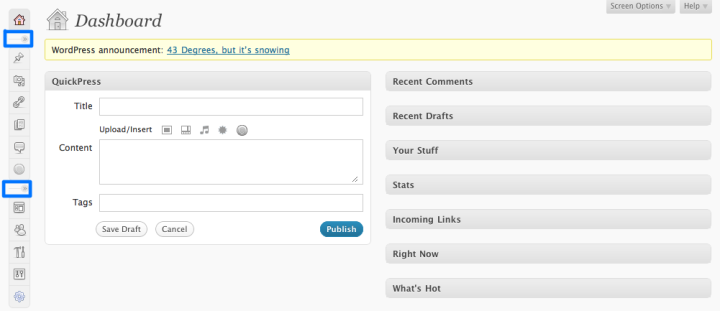
You can also collapse your menu to only show the icons, for ultimate minimalism. To do this, click a separator in the menu (highlighted below). Click again to expand them and display the text.
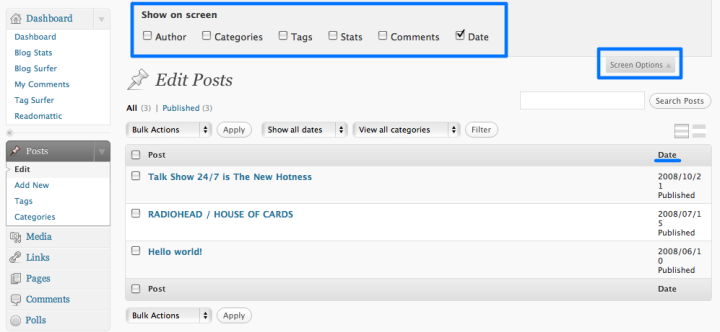
Change the settings under the Screen Options tab in the upper right to hide info that’s not important to you.
Clicking Screen Options from the main dashboard will display a list of the modules, which you can then hide or show. In this example, we’ve hidden columns that appear on Edit Posts
There are now also keyboard shortcuts for comment moderation. First, enable keyboard shortcuts under My Account > Edit Profile. Then use J to go down and K to go up the rows. Use A to approve, S to mark as spam, D to delete, E to edit, and R to reply.
A final secret shortcut is double-click. Just click twice on a comment in the Comments view to open up the editor.
And, as always, you can adjust the size of your editor.
In the coming week, we’ll be delving in to some more awesome goodies that came along with your new dashboard. Stay tuned!
 WordPress.com News
Thanks for all the tips. I still use WordPress 2.6.5 on another blog (I’m waiting for 2.7 to finish working through the release candidates before upgrading). It took me maybe two days to get used to the new admin interface, but I must say, now I can’t stand using the old one!
LikeLike
You forgot to mention: the dashboard colour profile can be changed from grey to blue in Users->Your Profile. 🙂
LikeLike
Yes, that’s true! Thanks 🙂
LikeLike
so customizable.
love it
LikeLike
Thanks for continuing to unveil the many treats of the new WP dashboard one digestible meal at a time!
I am especially thrilled to think I can find a way to make my drafts more accessible since I often post an idea in draft form for later and I’ve been having a hard time finding them.
LikeLike
I’ve (and I’m assuming other WP-ians also) discovered all of this as we fiddled around with the Dashboard items but thanks anyways for putting this up….for the benefit of the not-so-adventurous amongst us
I know this ain’t the right place to mention (and neither is ‘Support’, maybe there should be a ‘Feature Request’ page someplace!) but there are a few minor improvements that I’d love to see around the current look:
1. The ‘arrow’ which helps to open/close a module should be made permanent (and not appear only when the mouse is hovered over it) so that people will plainly know there is a provision to minimize them.
2. ‘Collapse all’/’Expand all’ checkboxes within the ‘Screen options’
3. Clicking on a comment should redirect to the post so that we can reply to it. Not the entire comment is displayed in the dashboard and replying would need us to read it in its entirety, so IMHO the ‘Edit’ link should replace the ‘Reply’ link at the foot-links and clicking on the comment should lead to the ‘Reply’ functionality.
LikeLike
I cannot communicate how awesome this new dashboard and its features are. Seriously…I used to spend a lot of time parked on the Stats page, since that’s a lot of what I used. But this…this is genius.
LikeLike
Sweet. Awesome tips on the new Dashboard Automattic!
LikeLike
Thank you for the very helpful tips!
LikeLike
As always, well done mates! Love ya
LikeLike
Thanks. I love it.
LikeLike
thanks for the help!
LikeLike
Sweet! X3… this remindme the Photoshop Cs3 interface! ^_^
Especially the “Collapse Icons” option! 😛
LikeLike
Thanks, but I wish they would allow me to move the menu bar to the right side instead of locked into the right.
LikeLike
WP.com is funtastic. I love it very much
LikeLike
Didn’t find all the goodies myself – so I guess next week I’ll listen you carefully again.
LikeLike
I really loved it! It so easier to deal with the new dashboard… Great job!
LikeLike
Thanks, its helpful. God Bless!
LikeLike
Cool, thanks!
LikeLike
New Dashboard is great. Mostly no learning was needed at all. Though, to get used to all cool goodies of it some time is needed
LikeLike
I was kinda thinking the new write post screen was too busy. All that gray gets pretty drab. Though i guess these tips would help, but more theme/skin options for the dash wouldn’t hurt either.
LikeLike
I didn’t know you could completely hide modules. Thanks for the tip!
LikeLike
I hated the last update you guys did, and I thought I was going to hate this one too, because it originally loaded all funky, but since it straightened itself out, I’ve been pretty happy with it. 🙂 Thank you and congratulation on a job well done. After reading this post I now realize it’s even better than I thought. 😉 Nice job guys.
LikeLike
What is Quickpress?
LikeLike
What lucky timing. QuickPress is up next!
LikeLike
How do you do these guys? Wonderful 🙂
LikeLike
The new dashboard is awesome! It loads fast and it has a ver sleek and pleasantly clean look. What’s more, you can shift things! WORDPRESS ROCKS! WOOOHOOO!!!
LikeLike
I am New Blogger, so need more information from wordpress admin.
LikeLike
We have all kinds of resources for you to check out through Support. Feel free to poke around, and write to us if you have any specific questions about your blog or account.
LikeLike
can’t wait for comments settings
and Heather, you are beautiful 🙂
LikeLike
Heh, I’m going to give it a try. Thanks for all the tips!
LikeLike
I wish I could say I designed this myself. This is really a super job. Makes you wonder if it can ever be improved. Congratulations.
LikeLike
Thanks a lot, WordPress! The new dashboard looks simpler (and of course better) than before. I liked the “customizable” features. Somehow, I feel that even better interface would be introduced to WordPress users in coming years. Cheers!
LikeLike
ta for this
errrr…….
what happened to the nifty font size/title button?!
the < h 3 etc – it’s vanished!
LikeLike
You can still change heading sizes. Just expand your toolbar by clicking on the icon to the far right, and then select the heading size from the dropdown on the left.
LikeLike
I really like all the great features and that I can customize my dashboard for ultimate efficiency!
LikeLike
Yea I love the new dashboard drag & drop function…its nifty! Means my screen is not 10 feet long!
LikeLike
Excellent, WordPress leading the way in blogs
LikeLike
new 2.7 dashboard design 😉
like it!
LikeLike
Thanks Heather, but I think most of us have figured most of it out by now. My main grouse was – and still is, even though I’m sorted now – that much of it is counter-intuitive and, I have to say, looks suspiciously like change for its own sake.
Lots of things are very different, very few are actually better for the change, and if not better, then what’s the point? An example of this pointless change is the attaching of the Visit Site button to the blog’s title. Mysteriously, because it’s perfectly obvious, this confused an awful lot of people. The functionality isn’t improved though and the change is 100% cosmetic only. Like the icons, which replaced a perfectly functional dashboard with something that, again, is different but not better (and why change the names of various functions – surely that’s change for its own sake, as it doesn’t actually improve anything).
One glitch, initially, was that the dashboard components steadfastly refused to be dragged to a new location, which was why I complained about everything except stats being in one very long column, though at some point that problem went away, and I’ve now got it as I want it.
Sorry to sound churlish, because I know a huge amount of work went into the new version. However, saving and publishing posts is now much faster, which I really appreciate, as I use Opera, with which Google Gears isn’t compatible, and it was painfully slow.
Despite what is repeatedly claimed in the forums, those of us who don’t like the new dashboard are not defective in some way, and we will not learn to love it in time. Well, I won’t. It reminds me of Vista – lots of bells and whistles, limited or no improvement in functionality. It’ll be interesting to see how 2.7 is received on WP.org.
LikeLike
Very cool! Keep up the good work WordPress!
LikeLike
Awesome!
It really helped.
Thanks WordPress!
~dark~
LikeLike
I learnet almost all these goodies myself, but i didn’t know what keyboard shortcuts were set (i heard about ’em).
LikeLike
Thanks very much for all the additional functionality! I would love to see the ability to change the order of the left side categories themselves – e.g. being able to drag and drop Pages to be right under Posts – but that’s a minor point, I guess. Thanks again for all your hard work, WordPress!
LikeLike
Thanks for the explanations which are very helpful. I’ll admit to being apprehensive about moving things around.
Very pleased with the new Dashboard, thanks.
LikeLike
Fantastic! 😀 Thanks for the WP team 🙂
LikeLike
Having fun playing with the new look. Must say – still using 2.6.5 over at the “big” blog – really feels old-fashioned, now.
LikeLike
I liked the new dashboard on sight, but after using it for a week I LOVE it! Really spectacular, I know how much work must have gone into it. Congrats to everyone.
LikeLike
That’s awesome! Thanks
LikeLike
I really like the new dashboard – thanks to everyone who worked so hard on giving us these tools!
LikeLike
WOW… U ARE SO GOOD AT YOUR JOB IT IS AMAZING!!!!!!!!!!!!!!!!!
LikeLike
I appreciate these instructions; however, I hate it when you change things. Just when I’ve gotten to be a wiz and know my dashboard backwards and forwards, boom! I have to start a whole new learning curve. Techies may like it, but it’s not friendly to us writers.
LikeLike
I’m loving it.
LikeLike
Great! Let me tell you one thing about snowy blog! This feature is not that good on blogs with white background. Maybe it’s not snowing hard enough!
LikeLike
If you ask me, i would prefer the old dashboard. I was used to it and now i find it difficult to “adapt”.
LikeLike
Thank you for this! Very nice to have so much flexibility.
LikeLike
Personally I think the new dashboard sucks.
There’s nothing worse than opening your front door to find all of your furniture has been moved.
The previous version was well organized and needed no ‘customization’
How about offering us the option to return to the previous Dashboard!?!?!
LikeLike
Love the new dashboard! Easier to use, and easier on the eye. Thanks for a great redesign.
LikeLike
hey thanks for the tips. when you’re new to this it can be rather complicated
LikeLike
I am really enjoying the new dashboard. It is much easier for me to navigate! Thanks!
LikeLike
I haven’t looked enough to be sure there isn’t one somewhere now, but if there isn’t a “restore defaults” option someplace on top, where you can’t get rid of it, you might want to put one in. It saves a lot of time for the technical support people.
LikeLike
I’m Loving this new design of WP Dashboard! It’s so Cool and Clean!
LikeLike
So far the ability to totally configure the new dashboard to my working habits is my favorite feature. Can’t wait to see what’s ahead.
LikeLike
All this looks great! My wordpress blog is self-hosted, so I haven’t got a chance to enjoy these upgrades yet, but if everything is still on schedule it should be rolled out to us self-hosted users sometime today. Can’t wait! Thanks for all the hard work.
LikeLike
Super sweet! Thanks!
LikeLike
WordPress Rocks!!
LikeLike
Thanks Heather, I was wondering about this. Off to go play with boxes & buttons now!
LikeLike
Great. No really! haha
LikeLike
That’s really cool! Thanks a lot! I’m loving the new dashboard 🙂
LikeLike
Super. Love it. Well done.
LikeLike
this is very cool. i havent been upto messing with my dashboard much, but now i shall do so. quickpress is so awesome!
LikeLike
This is all quite brilliant! Thanks.
LikeLike
This is incredible! Thank you, guys!
LikeLike
Heather,
In either case, WP takes a LOT of time to load. The Dashboard takes a couple of seconds. But when it comes to ‘Create a Post’ – Gosh! almost 15-20 seconds… I wonder if Team WP is going to do something about this. The WP problem is not just on my side… but many other WP.com users find the same as one of the reasons to stay away from blogging frequently… or atleast using WP as a blogging platform, if they’re in urgent need to say something.
LikeLike
You should not be encountering those kind of waits. Please contact Support and we can try to identify the problem. You may also want to try out the Turbo feature.
LikeLike
Thanks for showing that it is possible to make the box stretch across the screen!
LikeLike
hahah…..
that`s some interesting stuff
congrats, almighty worpress
LikeLike
salam
oh my word i just noticed now that we can reply back to comments!
———wait i just tried it out i thought it was like a thread for comments u no?
but sill very good u can easily reply back to the comments unlike be4, much easier!
i’d still luv like having a thread or whateva its called where u specifically reply bac to a comment but this will do! 😉
LikeLike
Thanks for the info! The new dashboard design is nice, but of course I haven’t adjusted completely yet, and it seems to take longer to save the post I am editing than it used to, but that could possibly be a user-side problem (PC, ‘net speed.)
Thanks!
God bless,
-b
LikeLike
Wonderful! You’re doin’ great gentlemen.
(Heather, will you marry me?)
LikeLike
Only one Word from a German Blogger:
FANTASTIC!!!!!!!!!!!!!!!!!!!!!!!!!!!!!!!!!!!!!!!!!!!!!!!!!!!!!!!!!!!!
THANKS WORDPRESS!!
Greetings,
Physioblogger
LikeLike
This is great, always something new to learn…thanks.
LikeLike
Heather-
love you and love WordPress but I am not crazy about the new dashboard design.
I was very comfortable with the old design that had the manage option.
How do I use the old version of the dashboard?
Keep up the great work here on WordPress.
Kilburn Hall
LikeLike
Thanks for the love! Sorry, but there isn’t an option to revert to the old version. This is the foundation for the rest of what is to come on WordPress. Onward and upward!
LikeLike
I am so grateful for the new dashboard, big thanx to the WP team for making this happen.
IMHO, being able to customize the dashboard to this extent will aid productivity.
LikeLike
Nice design 🙂
LikeLike
awesome, that makes wordpress unrivaled.
LikeLike
Great idea, thanks for the update : )
LikeLike
Hey thanks for all of the cool stuff and the great explanations!
LikeLike
Thanks so much!
LikeLike
You’ve done a very good job!!! Thanks a lot for all your recent improvements!
LikeLike
I wish that there was a Show-All Pending Comments feature instead of 20 comments appearing
LikeLike
There is a Pending Comments view under Comments in your dashboard.
LikeLike
I like the ability to choose what I want to see and shut down stuff I never looked at. Thanks for the changes!
LikeLike
I’ll agree with almostinfamous, QP is a great little tool. Almost twitter-like but without the character limitations.
LikeLike
My dear WordPress – have I said I love you lately?
LikeLike
I think this customization is good. I’ve already changed things a little, given that I won’t be using things like ‘authors’ etc. Nice going
LikeLike
It would be great if we could save a configuration to use across different dashboards.
LikeLike
Nice that’s pretty helpful, thanks alot.
LikeLike