

Learning to Love Comment Moderation

I’ll bet you never thought you’d see the day when you looked forward to moderating your comments, but this might just be it. Comment moderation has been vastly improved, with all kinds of little tools and changes to help keep things quick and painless.
The Comments menu of your dashboard has a new, beautiful layout. Above the comments queue, you’ll see options to filter by Pending (formerly known as Awaiting Moderation), Approved, and Spam:
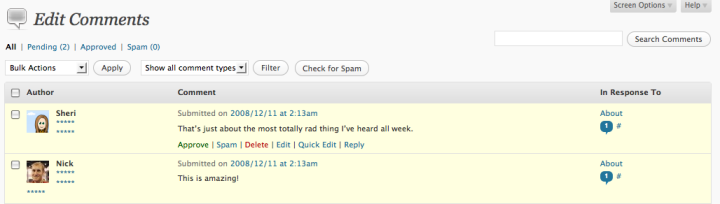
Below the text of each comment you’ll find action links, which let you Approve, Mark as Spam, Delete, Edit, Quick Edit, and Reply straight from the dashboard. After you’ve approved a comment, you can also Unapprove. All of these are color coded to help you move along faster than ever.
There’s also a section called In Response To, from which you can:
- Click on the number of comments displayed in the talk bubble to filter your comments view to only show comments on that post or page.
- Click the title of a post or page to go to the edit view for that post or page.
- Click on the # sign that appears next to the comment count to go to the post or page itself, on your blog.
To navigate to a specific comment on your blog, click the timestamp that displays after Submitted On.
You can batch edit comments by checking the boxes that appear next to each title. Then select the action you’d like to take from the Bulk Actions dropdown.

Comments also appear in the Discussion module on the Edit Posts screen. Action links, user info, and a comment permalink all appear here:

Action links also appear in the Recent Comments module on your dashboard, including pending comments, which display as highlighted:

Finally, you can moderate comments using keyboard shortcuts after enabling this feature under My Account > Edit Profile. Use J to go down and K to go up the rows, and use A to approve, S to mark as spam, D to delete, E to edit, and R to reply.
To learn more about what’s new in your new WordPress dashboard, check out this Support page.
 WordPress.com News
I enjoy the new comment features! Off topic… but will there be new themes for wordpress soon??
LikeLike
Keep an eye on the news blog for any updates about themes.
LikeLike
I liked the new change. Is it possible to mark comments as spam based only on their ip address?
LikeLike
Yes. You can enter IPs in the Blacklist under Settings > Discussion in your dashboard.
LikeLike
i really like this 🙂 🙂
LikeLike
You know a great idea would be “keyboard shortcuts” in places such as these (just like in gmail)
it makes sorting a list of things _so_ much easier!
LikeLike
Keyboard shortcuts are explained at the bottom of this post. You’ll find them easy to adjust to if you’re used to using them in Gmail 🙂
LikeLike
I have already discovered and played with the comment controls. I love them!!
LikeLike
I am seeing a lot of folks lamenting the new changes to wordpress.com but personally I have not found anything that is a big problem, for the most part, I believe you guys have done a great job of it. the comment moderation panel is easy, straight forward, and vastly improved over the latter. It is great, and I have put it to good use here this week and it has made short work out of what used to be a pain in ……. well it wasn’t much fun.
Take two atta boys outta of petty cash for a job well done wordpress.com this is the cat’s meow.
Don Smith
LikeLike
This is quick. I like this feature.
LikeLike
Thank you!
LikeLike
Just one question, how can I add a, for example, youtube video on my sidebar or maybe a flash embed code? The people can play and see the video without open another window. Why isn’t possible add more than one vodpod widget?
LikeLike
Sorry, but we don’t allow Flash for security reasons. You can use the Vodpod widget to add up to five videos to your blog’s sidebar. Just checkout the settings under Widget Style for that widget.
LikeLike
Still seems a bit more “engineered” rather than intuitive. The only thing I DO miss from last version was comments that ended up in Akismet separately identified as Pingbacks at the 1st screen.
Haven’t yet noticed any way to re-activate that feature.
LikeLike
There’s a filter for Spam at the top of your Comments page. There’s also a handy Check for Spam button.
LikeLike
Very good. Though there is so much new in this update, it is really well designed and therefore mostly understandable. There are new tricks and ponies I discover every day!
LikeLike
but why do those links appear only on hovering. It’s seriously confusing. You’re learning the wrong things from vista 😛
But great work with the interface otherwise. Have found it pretty smooth.
LikeLike
thanx 🙂 awesome job, really!
LikeLike
At first, it was like… where’s the? But when it was found and used several times…improved indeed. What can I say? GOOD JOB GUYS!
LikeLike
Some new features of 2.7 again. Great!
LikeLike
How is the “reply” used and how is it different from just posting a comment ?
LikeLike
Clicking Reply from your dashboard leaves a comment that responds to the one left on your blog, without needing to do any extra legwork.
LikeLike
It’s very useful, thanks!
LikeLike
Well, it helped me a lot. Thank you very much. 🙂
LikeLike
is it possible to make the reply comment on the same box of original comment I’m replying too instead of it shows up as a new comment?I’m having a hard time to explain it but I hope you know what I mean. 🙂
LikeLike
We’re working on some improvements and changes to comments and replies. Keep an eye on the news blog for developments 🙂
LikeLike
This is great! The action links really makes it so much more convenient to moderate comments on a blog like mine.
LikeLike
Great post, thank you 🙂
LikeLike
I love the new layout, but I hate the way the IP address, URL and email are squished into the corner. I can barely tell them apart now.
LikeLike
Great!
I love the keyboard shortcuts :þ
LikeLike
Comment replies are not hierarchical though. It’s difficult to tell who’s being responded to
LikeLike
We are working to update the theme designs to display hierarchical comments. We’ll let you know as soon as they are ready!
LikeLike
Yes Indeed, it has changed and I am liking it. Except it’s bit slow in IE, might some problem with my IE.
LikeLike
Try upgrading to the latest version of IE, if you haven’t already. I also suggest activating Gears through the Turbo feature to speed things up. If that doesn’t help, you may want to contact Support.
LikeLike
i still don’t need to moderate.
Let the comments still original. 🙂
LikeLike
Are there plans still to allow readers to vote(5 * system) on the worth of a post/comment?
LikeLike
We’re working on some changes to comments that will be rolled out in the coming months. Keep an eye on the news blog for updates 🙂
LikeLike
Cool! WordPress 2.7 is very nice! And easy too! 😀
LikeLike
That’s cool, thanks for the tip 🙂 Right now you can moderate this comment, lol
LikeLike
Love all the new changes – keep up the great work!!!!!!
LikeLike
It’s great to learn about all these tools that make WordPress easier to use. This is great!
LikeLike
All the changes, including comment moderation, are great! Thank you!
Andy
LikeLike
I LOVE the new changes, especially comment moderation…you guys are just the best…hands down!!
Thank you!!
LikeLike
@Sheri
Sure, we’ll wait for it. The reply system you provide is almost useless without it. i’d rather do it manually for now.
Thank You very much WordPress, you are the best 🙂
LikeLike
no more pain when moderating comments.. yeah 😀
LikeLike
I really am loving WordPress at the moment 🙂
LikeLike
This is quick. I like this feature.Thank you.fernirosso
LikeLike
It is much easier except for one thing. The edit and delete buttons right next to each other. Only a matter of time before I deleted a comment, sure enough last night, when tired it happened. I had to copy and paste from the email notification, apologize and reply. Could those two buttons be moved apart?
LikeLike
nice idea folks!! thanks 🙂
LikeLike
the only pain is that some comments require approval even though the default setting might be set to require approval if there are 2 or more hyperlinks…when previously comments w/o links were simply posted w/o requiring approval (as determined by the settings) – is this a bug or are we missing something?
also noticed on the Dashboard that the left nav options are hidden behind the Stats graph in Firefox when the Stats module is in the top left spot
LikeLike
That comment moderation issue was a bug, but it’s fixed now.
Please contact Support about the issue you’re describing with your dashboard.
LikeLike
I have totally loved the comment moderation. It rocks. I have liked most of the new changes and I’m not a huge fan of change. Gracias 🙂
LikeLike
I love all the new features. They’re fantastic! Thanks!
LikeLike
Very easy to use; thanks. Now, I’m waiting for the upgrade that allows comments to appear in REVERSE chronological order.
LikeLike
Wow! This is really useful! I currently sit eagerly waiting for comments to moderate! 😀
LikeLike
On the old dashboard I could allow my regulars to post 1 link without being placed in the moderation queue.
Now, with 2.7, I see the option, yet somehow each and every time they post a link it’s held back.
I had to disable the links limit which is something I’d rather not do.
LikeLike
This is a known issue. Please contact Support so we can get back to you as soon as it’s resolved.
LikeLike
Like the new features, but I’m not a great fan of the new posting format- I preferred it before!
~Bodge101~
LikeLike
Some new features of 2.7 again. Great!
LikeLike
1 of the little changes I like…
LikeLike
great improvements and i really love it. btw; if there is a command to find the person with most comments in our blog would be very cool.
LikeLike
my first day at wordpress and im loving it
thnx for the nice tutorial
looking fwd for development of fonts adjustment, it’s driving me crazy that i can’t change the font size/type..
thnx alot
LikeLike
Love it, many thanks!
LikeLike
2.7 does it again!
LikeLike
i like this dashboard mode 😀
LikeLike
thanks wordpress you’ve really made my blog fantastic especially the
‘Blavatar’ there so cool!!!!
Thats all,
Chater :-]
LikeLike
i love new comment moderation
LikeLike
Great stuff! You guys have been reading my mind. Now, if you could just figure out a way to get shy readers to leave comments, we’d be golden. Thanks for the quality work!
LikeLike
I just love the new layout, now that I have got used to it it is much more user friendly. But, away from subject, it would be good to have a fluid 3 column theme which also has a customisable header, for me that is the only thing missing…
LikeLike
Heather, when the icon tool bar is minimized to show just the icon, it doesn’t show that there’s a comment waiting in moderation. That’s really about the only improvement I could wish for right now. Can we have an early Hanukkah present? 🙂 Otherwise, loving, loving, loving it.
LikeLike
as a newcomer to wordpress, i was most impressed to see that i could moderate comments. i have previously blogged on other sites, but never once encountered this feature and am glad to see it here!
LikeLike
That’s just about the most totally rad thing I’ve heard all week!
LikeLike
Nice but for blogs with a lot of traffi what is really needed is a “moderator only role” to allow the admin to assign the moderation tasks to others, without giving away other important rights.
Currently the “editor” setting gives too much power to somebody you just want as a moderator.
LikeLike
i don`t understand =(
LikeLike
Do you have a specific question about comment moderation? Trying reading through our Support pages or contacting Support if there’s trouble with your blog or account.
LikeLike
when “reply from email” feature out?
LikeLike
We’re reviewing the results of beta testing for this feature. Keep an eye on the news blog for any updates 🙂
LikeLike
It was a shock – but now I love it. Thanks
LikeLike
I really like it : ]
LikeLike
Love the new wordpress layout.
LikeLike
Can you make it so someone’s comments dont keep ending up in spam?
LikeLike
For issues with spam, please contact Akismet.
LikeLike
Yet another great tool for my blog…..and it isn’t even Christmas yet! 😎 THANX
LikeLike
That’s really great. Good job!
I have one question about comments – how can I see for example, which was the 5 000th comment on my blog?
LikeLike
Your best bet is going to the Comments page and then going to the appropriate page and looking at the ID in the URL.
LikeLike
Good work, well done.
When will we get threaded comments? You know, so that when someone makes a comment, you can reply to that comment and your reply appears subordinate to that comment? Rather than at the end of all the other comments?
That’d be neat. Even better than rearranging and renaming the buttons on the comment moderation page.
LikeLike
Right. No ETA yet, but it is something we want to do.
LikeLike
Parts of this is great! And it is easy. I have had nothing but problems with moderating posts with links in them. I did not have this problem before, but since the update it seems that they all need approval.
LikeLike
This is a known issue. Please contact Support so we can get back to you as soon as it’s fixed.
LikeLike
So much easier to moderate, love the new feature, great job guys.
LikeLike
new improvements is easier than the old one..thanks wp..i’ll keep on post.. 🙂
LikeLike
Now we can reply to comments. THANKS!!! I was just goin to ask you that. Heather. you seem like the nicest person in WordPress… I see that you always reply to questions. THANKS!!!
LikeLike
This is a handy update. It’s great being able to easily correct spelling etc on comments. Thanks
LikeLike
i like this,thanks
LikeLike
How about creating the option of inserting an audio file in the article that can be played directly there, just like the youtube videos (and as it is on blogspot.com)? I mean freely, because I know about this option available for money.
Thank you.
LikeLike
Audio can only be uploaded to your Media Library after purchasing the Space Upgrade. However, you can still use the audio player on your blog by linking to an audio file hosted elsewhere. Check out this page in Support for instructions.
LikeLike
I’m wondering how I can disable the two emails I get that accompany each comment. I’d rather not get those emails.
LikeLike
You can change your comments settings under Settings > Discussion in your dashboard.
LikeLike
Loving this 😀
LikeLike
This is actually my favorite change that has been made recently.
LikeLike
Like the new features, but I’m not a great fan of the new posting format- I preferred it before!
LikeLike
i must say, the new comment moderation has been very efficient. deleting spam comments is fast and as well as approving comments.
(^^,) total fun
LikeLike
But I’m still having trouble to moderate multiple comments at once using opera mini 4.2 phone browser (which I never experienced it with previous design before). I mean, when I approve selected comment(s), sometimes it failed to do so and those comment(s) still pending somehow. It really frustating since I often check and approve some comments from my phone, when I’m away from my PC.
LikeLike
Sorry to hear this. We don’t officially support Opera Mini, but if you want to send an email to our support team, we can check into it.
LikeLike
It is wonderful and grate.
LikeLike
I love it grate job guys.
LikeLike
love the new outlook in appearance keep up
LikeLike
If we think a comment is more appropriated in another post, is there a simple way to move comments from a page to a post?
For example my blog has lots of different specific themes and many people send comments at the bottom of the welcome page (which is an updated static page with links towards all the topics covered) instead of sending the comments on the actual post related to the theme they are talking about. Is it possible to move their comments?
LikeLike
Unfortunately you can’t move comments between posts.
LikeLike
falling in love with 2.7 over and over again. hehe 😀
LikeLike
Thanks for this.
LikeLike
I love it, is it possible to automatically email your response to the commenter?
LikeLike
Reply to comments via email was recently tested in a closed beta. We are looking at the results and will keep you updated on the rollout of this and other comments features on the news blog.
LikeLike
Many thanks for the wonderful features!
LikeLike
I’ve always liked to Moderatore my comments! But this just makes me love it!
LikeLike
This is great! The action links really makes it so much more convenient to moderate comments on a blog like mine.
LikeLike
been thinking whether the title is a joke or your were just sarcastic. some +3 weeks ago 95 % of the comments didn’t have to be moderated and life was good (see participation blogs like wednesdaystamper.wordpress.com and others). now it’s reversed and it SUCKS big time! yes, it’s easy to moderate comments now on front of the dashboard, thanks for complicating life for people with jobs and a life away from the pc.
LikeLike
If some of your contacts are getting stuck in moderation, please contact Support.
LikeLike
If I got comments this would be lovely c:
Very clean and easy interface, great job~
LikeLike
I have already discovered and played with the comment controls. I love them!!
LikeLike
not bad not bad but im not a big fan on commenting lol
LikeLike
Thanx for all the tim WP.
LikeLike