

Set Your Blog’s Timezone by City

One of my favorite things about working on WordPress.com is that improvements get made and pushed out as soon as they’re tested and ready. Just a day after I wrote about manually changing your blog’s timezone to account for Daylight Saving Time, Ryan updated WordPress.com so you can now set your timezone by choosing a city.
Here’s how it works.
Log in to your dashboard, click on Settings > General, and scroll to Timezone. You now have the option to pick a city that’s in your current timezone instead of a UTC timezone. For example, I live in the same timezone as Los Angeles, so I’ve selected that city.
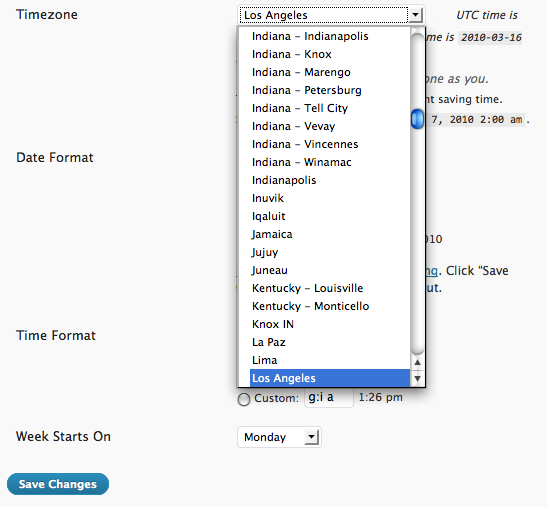
Once you’ve set your timezone this way, you won’t need to change it again to account for Daylight Saving Time. WordPress.com will automatically update your blog’s time settings as needed.
If you’re interested, here’s a full list of the timezones we support for reference.
- March 16, 2010
- HowTo, settings, WordPress.com
 WordPress.com News
It’s funny that this screen shot shows two Kentucky cities that are in the same time zone.
LikeLike
Well done and thank you.
LikeLike
Yay! That’s awesome; thanks for updating this 🙂
LikeLike
Way to go!!
I’ve been bragging about wordpress ever since I moved here from another blogging site a few weeks ago. With good reason. You’ve just added another one.
This is great!
LikeLiked by 1 person
Little things mean a lot. THANKS!
LikeLiked by 1 person
Excellent!
LikeLike
🙂 This change makes me a happy bunny……….
Love WordPress……
Cheers Guys..
LikeLike
Thanks! I hated having to calculate where the timezone was w.r.t. Greenwich. This is fantastic!
LikeLike
Why does Indiana need six different choices and there’s nothing for Arizona, which is its own damn time zone? Useless.
LikeLike
“Phoenix” is available as a city choice, in the America section of the list.
LikeLike
It’s not on mine. Says to click on a city… but I clicked everything possible, no list of cities pops open. Help!
LikeLike
PJ: Please contact support for help troubleshooting: https://wordpress.com/support/contact/
LikeLike
I totally love that WordPress.com is constantly getting improved feature by feature and not in big chunks with lots of time in between.
LikeLiked by 1 person
Awesome! do we still have to update manually?
LikeLike
After you pick a city for your timezone, you won’t have to update this setting again to account for Daylight Saving Time.
LikeLike
Now I have to figure out where, exactly, I live.
Great.
LikeLike
Thank you!
LikeLike
Thank you Paul and Ryan! All is well in the world today!
LikeLike
Excellent improvement. Thank you!
LikeLike
Super !
LikeLike
Brilliant! Thank you so much!
I love you guys!
LikeLike
That is just so super!!! Really cool stuff!!!
@pjhornberger:
Just try to scroll up in the list where the UTC-s are listed. The cities are on top.
LikeLike
I don’t know why there is need to set the “time zone”… it seems superfluous to me–what does it matter?
LikeLike
It can make a difference if, for example, you use our scheduled post feature. https://wordpress.com/support/posts/schedule-a-post/
LikeLike
wow… that’s insane!
LikeLike
Thank you! Why so few cities for California? Used Los Angeles, saw Monterey but where is San Franciso or Sacramento, both much larger than Monterey? Good job anyway, appreciate it!
LikeLike
mine still shows the old version…not cities??? what’s up? I can’t set it…it say pick a city but when I click on the pull down menu there are no cities!
LikeLike
Did you try scrolling up the list? Cities are available above the UTC timezones.
LikeLike
Awesome update!
LikeLiked by 1 person
Great!
LikeLike
Great info. Thanks ! Worked perfectly.
LikeLike
Great update! Looking forward to have this feature since I’m on WordPress.com, so two years ago. Hey WP team, you’re great!
LikeLike
And *snap* just like that, 10 million+ WordPress.com blogs get an update! You guys rock!
LikeLike
Thanks WordPress. I love that I will no longer have to manually date my posts when I blog straddling that utc time/date thing!
There is no better blog platform than WordPress in my opinion. The consistent improvements simply make it easier for us writers to do what we do.
Andrea
LikeLiked by 1 person
WHEEEEE!! I LOVE WORDPRESS!!!
Ahem.
Thanks so much, WP team! 🙂
LikeLike
Excellent…so good to stay up-to-date with the right time zone…brings the world closer. Congrats.
LikeLike
You guys are amazing! I am new to blogging (I started 12/31/09) and it has been an incredible experience. Thank you so much for all you do!
Have a beautiful day!
Kimberley
LikeLiked by 1 person
This is so much easier. I always had a few problems with WordPress because of the UTC timezones. Now that things are better, I’m happy.
Keep up the good work, WordPress! 🙂
~Sara
LikeLike
🙂 🙂 🙂 🙂
LikeLike
Always thinkin’! Good job Ryan!
LikeLike
There’s no Seattle or Portland.
LikeLike
Fantastic!! That’s really helpful! Thanks so much WP!!!
LikeLike
time zones according to cities will be good 🙂
thanks …..
LikeLike
So to represent the whole of New Zealand, you have Auckland?! It’s not even the capital city.
Where’s Christchurch? Dunedin? Wellington?
😦
LikeLike
Not every city in the world is listed. You can see all the available timezones here: http://php.net/manual/en/timezones.php
LikeLike
I feel sorrow…. it can’ t be used in Kuningan – Indonesia.
LikeLike
It’s great that we now don’t have to worry about DST changes in time.
LikeLike
And this is why we love WordPress. Every site has problems. You’ll fix ’em in a day. Keep up the good work.
LikeLiked by 1 person
Huzzah! I love it!
LikeLike
Timely… I’d only just learned how to update my time zone this week and you lot go and make it all accessible like. Bravo. Love WordPress. Yes.
LikeLike
I followed those instructions and it did not work for me.
LikeLike
Please contact the support team at: https://wordpress.com/support/contact/
LikeLike
Simply brilliant 🙂
LikeLike
It’s about time… 😀
I like being able to select “Manila” instead of “UTC+8”. Thanks!
LikeLike
What an improvement over the old, primitive way!
LikeLike
Much appreciated, made the change right after reading this. Oh yeah, WordPress is awesome!
LikeLike
SAH-WEET!
LikeLike
Brilliant! Brilliant! Thank you so much!!!
LikeLike
What! No Boston?
Did WordPress not have a WordCamp here a few months ago?
How soon we forget! 😦
LikeLike
Thank you very much for this valuable feature upgrade. 🙂
LikeLike
I just set up my first blog a couple days ago and the UTC+ method was quite confusing – no cities, eastern time etc. No sooner do I think about it and you have made the improvement. Great job! Thanks for getting things done.
LikeLiked by 1 person
thank you thank you! about time. this makes coordinating group posts much easier.
LikeLike
Theres Antarctica, but not San Diego?!
LikeLike
Cool! thank you folks 🙂
LikeLike
What about a city in a different country? Now that would be an amazing option. I live in osaka, Japan, how about adding that.
Thanks WordPress, you guys are doing a great job, really.
LikeLike
Excellent. Thank you.
LikeLike
Excellent !
LikeLike
Thanks so much wordpress.com!
HAPPY ST. PATRICK’S DAY
It really will be a green Irish St. Patrick’s Day here in Hawaii with the very much needed rain we are finally getting even now as I post this!!
Blessings to all this day of March 17th 2010 !!!!!
LikeLike
great! better than ever…thanks!
LikeLike
I know this is a very good help for us. I think this is not a new thing. Because, WordPress provided this one long time ago, didn’t it? However I didn’t notice about saving time zone since we live in a tropical country, we do not have such saving time at all.
LikeLike
Thanks guys! You even have Timbuktu. Gotta love that, immediately set up.
LikeLike
thank you. it’s brilliant
LikeLike
Great. Immediately changed to Qatar!
LikeLike
That’s great….You guys rock!
LikeLike
Looks awesome!
LikeLike
This is great! The +/- method was confusing…I actually used to just click one until my correct time showed up!
LikeLike
great! thanks.
LikeLike
Thank you so much for this function…!
LikeLike
That’s cool, thanks for the tip
LikeLike
It was a nice attempt to help make things easier for people to identify which timezone they are in. It isn’t an easy task but I find the listing woefully inadequate and incomplete. I live in the DFW area (Dallas/Fort Worth) which comprises several million people but there was no mention of it or any city in Texas for that matter. The way this was implemented means I have to know that Chicago is in the same time zone as Dallas and select it. If I know this I can probably supply the correct UTC code.
It might have been easier to identify where you are if you picked state name. At least we all recognize which state we live in and it is only fifty entries. I realize that a few states range a long way from east to west may and stretch across more than one time zone (Kentucky, Tennessee, Texas and Alaska) but for those you could have multiple entries. For example, Kentucky could have Louisville and Bowling Green. Big enough places that may be recognized geographically. Then there are states like Indiana that just take a great deal of care.
I will leave the countries representatives to fend for themselves so they don’t need to know that the Netherlands is CET (UTC+1) but in this case a country might do.
Obviously, for the computer this is a nothing more than a table lookup. Setting the time correctly is easy for the computer once the reference is identified. Computers are supposed to make our lives more easy. In this case, we just need a few more references.
LikeLike
We’re pulling from a timezone database that’s maintained by the great folks at the PHP open source project. As far as I can tell, there are four US cities listed for the four continental timezones: Los Angeles for Pacific; Denver for Mountain; Chicago for Central; and New York for Eastern. Additionally, several cities in Indiana because of that state’s unique timezone challenges, plus two in Kentucky, Phoenix, Juneau, and Honolulu. There’s a bit of discussion you can follow along with about substituting timezones like PDT for cities here: http://www.php.net/manual/en/timezones.america.php
LikeLike
Wait, no Canada??
LikeLiked by 1 person
There are several Canadian cities listed as timezone choices, including Toronto, Vancouver and Winnipeg.
LikeLike
Thank you- Great work-
This is my DREAM FOR THE FUTURE : each blog becomes a PERSONAL Radio and/or a TV station, so I could broadcast my programs on my blog.
I believe in Google/Wordpress team AAA +
VINH LUU
LikeLike
Note on the cities listing: Some people are, as always, going to disagree with the cities chosen, or wonder why there are two cities in Kentucky, etc.
These names are not random. They are the official standard names for the various timezones in the Zoneinfo database. The first part of the name is the continental area (which is why Hawaii’s zone is Pacific/Honolulu). The second part of the name is a large city that is central-ish to the time zone, and which is also probably not likely to split into multiple zones any time soon.
The reason for seemingly unnecessary zones is because of historical changes. Those two Kentucky cities, Louisville and Monticello used to have different dates on their Daylight Savings Time implementation. They no longer do, but whenever the law changes things around, a new timezone is formed. These sorts of timezones don’t just describe the time, but also describe when the time changes there. So that’s why the list is so long, and why there may be multiple cities that currently describe your situation.
Future versions of WordPress (org) might have a better method for choosing timezones. We’re working on it (and maybe we’ll have a MAP!) . This new feature of wordpress.com came from there, so it’ll get updated when we come up with a better way. The purpose of this was to eliminate the annoying daylight savings problem, and for that purpose, it works for now.
LikeLike
Otto, thanks for the background – really helpful.
LikeLike
Also, here’s a good site to help you figure out what standardized timezone you live in: http://www.travelmath.com/time-zone/
LikeLike
Wow I find this very useful! thanks
LikeLike
What about Arizona? It doesn’t observe DST. Right now it aligns with Los Angeles, but is usually on Mountain Time.
LikeLike
Select Phoenix from the list of cities.
LikeLiked by 1 person
Good news.
Thank you.
LikeLike
Wow, What Can i say? Bravo! keep it up.
LikeLike
Thanks guys! The selections of time zones by city will be more close to your local time. Well done wordpress!
LikeLike
Thanks!
LikeLike
I “heart” wordpress.
😉
LikeLike
well done…thanks for information
LikeLike
great..thanks !
LikeLike
Hey there WP guys. Thanks a lot for this, I just finished reading the post about changing the UTC zone for daylight savings then I came across this so I set it for Tasmania & I can now forget about it forever. Awesome & thanks again!!!
Wordpress is the greatest.
P.S. Now all we need is the Random Blog button back in the top right corner & everything will be perfect.
LikeLike
finally…things that I’ve been waiting for
LikeLike
smile thanks, indeed, nice to upgrade the information.
LikeLike
No Chicago? No Dallas, no city in Texas at all. I can’t find a city I know is in my time zone.
LikeLike
Chicago is definitely in the list, let us know if you still can’t find it.
LikeLike
Wow, that’s a cool feature….
LikeLike
Thanks very much about timezones but I understand english just little.I lives in Indonesia,so it’s very nice for me if about all of that in translate to Indonesian language.
LikeLike
Definitely an improvement, BUT… you have like 10 places in Antarctica and no Seattle? Not even Portland or San Francisco?
That being said, still an improvement over the previous method.
LikeLike
this rocks but maybe you should refine it by adding a couple of places every week. because i agree with Margaret Hebron. That being said, still an improvement over the previous method. wordpress has how many bloggers and only so many cities are in the new time zone option. i would love to see some of the towns in the north of canada up here on the site!
LikeLike