

It’s 2am, Where Are Your Posts?

Have you ever read one of your old posts and thought something was different? Maybe a few words were changed, the formatting was different, or an entire paragraph was missing. You poured your heart and soul into the post and didn’t know someone changed it after you hit publish. If this sounds familiar, you probably have a multi-author blog. 🙂
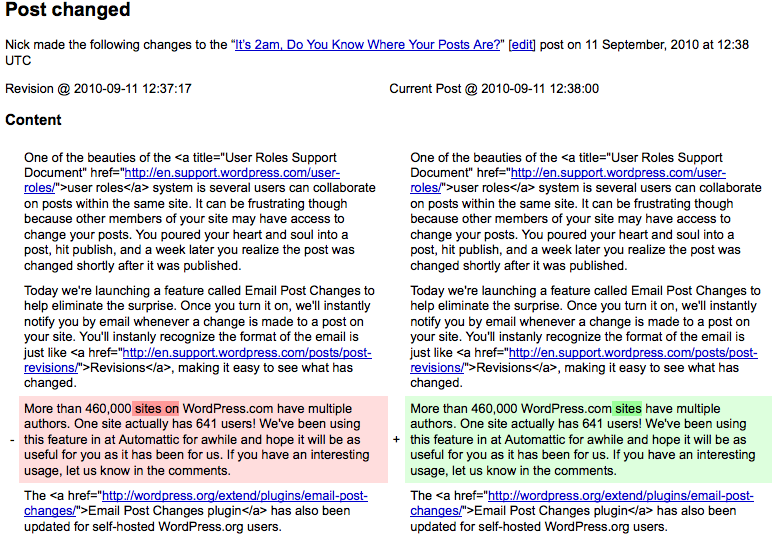 Today we’re launching a feature called Email Post Changes to help blogs with multiple authors collaborate better on the same posts and pages. If you turn it on, we’ll instantly notify you by email whenever a change is made to a post on your site. You’ll recognize the format of the email is the same as post revisions, making it easy to see exactly what has changed.
More than 460,000 WordPress.com sites have multiple authors, with one site having 641 users, so we think this will be a great feature for a lot of you. We’ve been using the email notifications at Automattic for a while and hope it will be as useful for you as it has been for us. If you have an interesting usage, let us know in the comments.
For more details and configuration help, head over to the Email Post Changes support document.
The Email Post Changes plugin has been updated for self-hosted WordPress.org users.
 WordPress.com News
Useful for me as my friend and I are constantly editing stuff on epic9.wordpress.com. Truly useful! 🙂
LikeLike
Lovely feature .. !
I’m impressed evertime you develop something new ^^
LikeLike
Thanks for the info, Although I don’t have anybody to share my blog with, but would love to try it out sometime! 😀
LikeLike
I love this! I hope I’ll get a team going for my blog real soon. 🙂
LikeLike
Nice new feature this will come in handy.
LikeLike
Even though my blog doesn’t have multi-authors, it’s great to know about this, maybe I’ll try the multi-author thing someday, if I trust someone a lot.
LikeLike
Perfect! Now I can start a team blog… without having to worry about issues regarding their revisions.
LikeLike
Sounds like a good improvement. Some questions:
I assume that other team members will get automatic notification only after person #1 has made all the draft changes and then SAVES those changes? Otherwise it’s multiple email alerts for incremental changes each time a person hits SAVE button, then goes back into it to make the next change.
I’m often Save changes when I work on a post because I need to preview each stage, before moving onto next section of post, etc.
LikeLike
If the Drafts option is turned on, every time you click the Save button, an email will be sent with the changes.
LikeLike
Just in time. I´m thiking to call friends to blog with me 💡
LikeLike
Another useful feature. Well done wordpress.
LikeLike
I guess the problems this new feature addresses show the up side to blogging on your own 😉
LikeLike
Great new feature. Thanks, wordpress!
LikeLike
excellent idea for those who have writers submitting articles for the editors to preview and change where nessecsary. It can show the writers where changes were made and why, as well as how the changes have enhanced their work.
Only other addition to the UI would be to add ‘Pending” access from the drop-down menue that allows access to the Drafts, New post etc in the upper right menue, as well as access from other areas in the side menue area. As it is now, the Pendings is several clicks away, rather than one click from the menues.
That would be a great help guys/gals. As it’s an area editors have to access a great deal when placing the items in there prior to publication so that they are separate from those in ‘Drafts’ (ie – works in progress)
LikeLike
Wow – cool! I don’t have any collaborators, but this is SUCH a cool feature!!
LikeLike
Great for those who need this feature. Six hundred forty one users is a lot!
LikeLike
I tested this with someone else several thousand kms. away.
It would be even better if the blogger administrator had the choice to check off only certain articles that team collaborators needed email alerts on changes to a post or page.
LikeLike
One site has 641 users? Wow! I can certainly see a website such as that needing a feature like this to keep the quality high and errors minimal.
LikeLike
That’s awesome! Now I don’t have to worry about post changes anymore! My blog has jus one author (me), but it’ll help me know if anyone or anything edits my blog. I once had a spambot edit my blog (I have no idea how it got a hold of my password, but it did), but now I’ll know if any changes are made before anyone notices them.
LikeLike
I’ll invite some people to my blog to make use of it – anyone interested?
LikeLike
I have a Q?
If a site has multiple authors, and you enable each authors email contact details, do they get every alteration from any post, or only the alteration to THEIR post, otherwise you’d have numerious authors getting emails about other authors posts that have nothing to do with them.
So am I correct in assuming that the alteration to a specific post only notifies the author of said post, rather than every author that has been selected in the ‘Notify’ section – would that be correct??
Thanks . . . .
LikeLike
Every user or email address set in the Settings will get notified for every change, even if the post is not their own.
LikeLike
I’m far too anal to allow anyone to post on my blog (lol)… but still wanted to let you know how much I appreciate how much attention and time is put into improving the options available to WordPress.com users. You folks are some of my favorite people in the whole fraccing world!
LikeLike
although i dont have a multiuser blog, that is very usefull. thumps up
LikeLike
Looks cool. I’ll be surely going to use it on our teamblog.. as soon as we get one set up
LikeLike
A perfect update….
Now i can start a multi-author blog without much tension.Now,I’ll try to make a 3 to 5/6 people team after some months. Keep it up, as you’ll bring new every time
LikeLike
This is a nice feature that is available elsewhere, so I’m glad to see it at WordPress, too.
LikeLike
excellent!!! i don’t know if this applies to me [im sure it will take long enough for me to find out] but it sounds like a good idea for those who do need it. Peace of mind all the way around on this site huh!!!
LikeLike
This is very nice, thank you! So much more efficient than emailing changes back and forth between writers. Sweet!
LikeLike
So what happened to the “It’s 3am, Where Are Your Posts?” post, which you guys posted yesterday?
LikeLike
The date was wrong when it was originally published.
LikeLike
I might be adding people on my site as well, that would be a useful feature.
LikeLike
Bravo, I am on two sites with multiple authors. I can only imagine how helpful, this could be.
LikeLike
It’s something useful to have, but I currently I don’t have any intention to share posting with others.
LikeLike
I might add people to my site! This could help a lot!
LikeLike
Thanks! I look forward to giving it a try.
LikeLike
Thanks!! Another cool feature. What are you guys thinking of next??? Keep ’em coming 😀
LikeLike
Great! I don’t actually have a multi-user blog. But I’d like to set one up.
LikeLike
This will really help for small to medium organisation who are leveraging the WordPress to promote their objectives, thoughts and products.
LikeLike
Thanks, it will help me a lot.
LikeLike
Yea, this will be a big help.
LikeLike
This will be great if my co-blogger ever jumps in and actually contributes! 🙂
LikeLike
This will be a great aid. Another useful feature. Thanx WordPress.
LikeLike
Wow! I’m the sole author of my current blog, but if I ever create a multi-user blog, this feature will be extremely helpful.
You guys never cease to amaze me. Thanks WordPress!
LikeLike
That is a great feature. I could add another person to write on my blog without worries.
LikeLike
Short and right to the point. Great info.
LikeLike
Thanks for the good stuff. This is really useful for me…
LikeLike
Wow! Thanks! I mean, it’s not like I don’t trust my trusty co-authors, but still. It’s a good precaution.
On another note, isn’t there some way to make your co-authors not be able to edit your posts though?
~Bookworm4evr
LikeLike
You can assign Author role to your co-author, instead of Editor or Administrator role. Uses with Author role can only edit, publish and delete their posts.
LikeLike
Great! I have been waiting for this feature, can wait to use it 🙂
LikeLike
This will be a great help for my school’s chapter of Phi Theta Kappa at alphapialpha.wordpress.com. Thanks, guys!
LikeLike
nice feature…Keep up the good work 🙂
LikeLike
This is awesome I would definitely use this feature as my friend and I might work on some posts together
LikeLike
This is a great feature! My blog hasn’t exactly started off yet, but if other people post or make changes to my post, I would most definitely want to be informed.
Thanks so much!
LikeLike
Good feature. Thanks!
LikeLike
No way. This is a one man show.
LikeLike
Good stuff. A friend and I have been planning to start a blog together and this could be really helpful for both of us. THanks!
LikeLike
Thanks for this good stuff, I have not use multiple authors on my blog. Will come to that when I’m ready
LikeLike
It’s great feature I’ve been wondering so far if it was available, as I’m planning to have my blog pals as co-author. It could be helpful for us.
LikeLike
Still trying to get familiar with WP, and loving it every moment!
LikeLike
Wow it ‘d be more beneficial for viewers. Now they can read multi-authors opinions in the same blog and issues.
LikeLike
With my blog – average 100 persons a day – only one blogger – it’s quite impossible to change the content of my posts … unless is another ME ? Or drunk ME:)
LikeLike
Awesome dude!
LikeLike
I was hoping this blog was raising some sort of philosophical question, but I like the idea of the feature regardless.
LikeLike
We only have 3 users on our L3gaci.com blog, just starting out, but it seems like a nifty feature to have!
LikeLike
This is great. Opens up a whole new opportunity to expand blogs. Thanks!
LikeLike