

Read All Your Favorite Blogs in One Place

If you feel like it’s a chore to keep up with all your favorite blogs, you can now read posts from all the blogs you follow (even the ones that aren’t on WordPress.com!) in one convenient place on the WordPress.com home page:
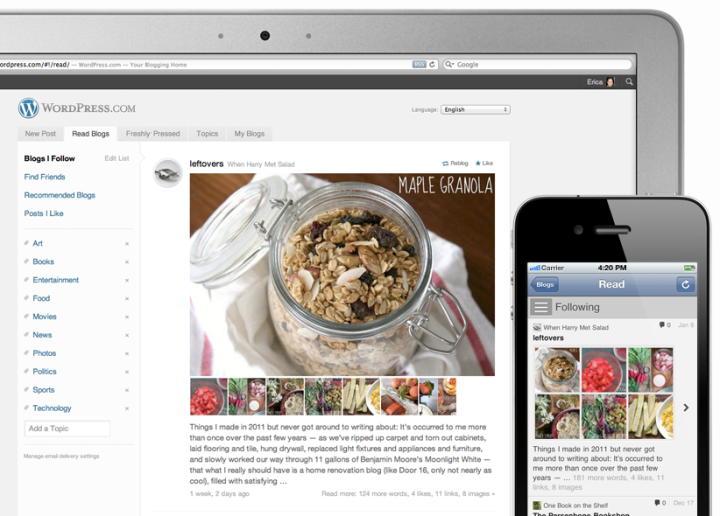
Your reader displays all the posts across all the blogs you follow in the order they were published, with the most recent content appearing at the top. You’ll see an excerpt of the introduction to each post, the first image in the post, and thumbnails of any other images that the post contains.
You can even like and reblog WordPress.com content directly from the reader (we’re working on bringing reblogs back to the toolbar!) using the icons in the top right corner of each post:

Whether you’re at the computer or using the WordPress app on an Android or iOS mobile device, having all the posts from the blogs you follow in one place makes it easy to find the updates that are important to you, and skip over the ones that aren’t.
Click  in the toolbar at the top of any WordPress.com site (you must be logged in to see it) to add new blogs to your reader. For directions on adding blogs from Tumblr, Blogger, and other services to your reader, check out the support document on managing the blogs you follow.
Discover New Blogs, Too
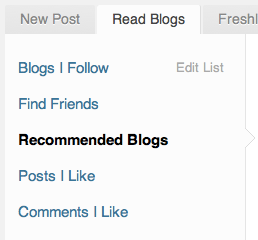
To find some awesome new WordPress.com blogs you might like, check out the Recommended Blogs section of the reader:
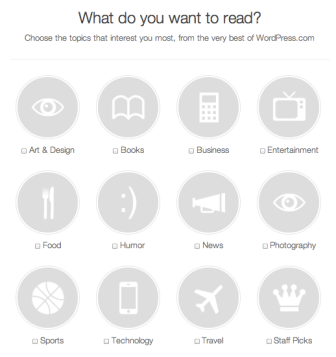
Right now you can browse blogs in twelve different categories, and we’ll be adding more very soon.
Use WordPress.com as a Real-Time Information Network
If you want to see what people are saying about your hometown, favorite sports team, or a concert you attended last night, add any topic to your reader to create a stream of all posts published with that tag.
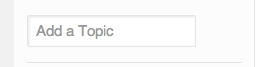
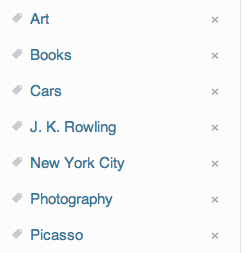
You can add as many topic streams to your reader as you like. You’ll notice frequent updates being published under general topics like “art” and “books,” but you can also add more specific topics like “Picasso” or “J. K. Rowling.”
Want less email?
Each time you follow a blog, new posts from that site will appear instantly in your reader, and you’ll also receive them by email. If you prefer to receive email notifications on a daily or weekly basis, or not at all, you can change your default email settings from the bottom left corner of your reader. You can also change your email notification preferences on a per-blog basis.
Find Friends on WordPress.com
Want to see if any of your Facebook and Twitter friends are on WordPress.com? Give the Friend Finder a try:
So, how will you use the reader, and what can we do to improve it?
- January 20, 2012
- Reading
 WordPress.com News
Fan. Tastic.
LikeLiked by 2 people
Reblogged this on Matt on Not-WordPress.
LikeLiked by 2 people
Reblogged this on danielbachhuber and commented:
Making progress! Previously.
LikeLiked by 1 person
Reblogged this on chefherman.
LikeLiked by 1 person
This sounds spectacular … I guess the only question I’d have (and perhaps this isn’t the right place to pose it, but I’m just throwing it out there) is how does one become a “Recommended blog” in the eyes of WordPress?
For example, my blog would probably qualify as a “Humor Blog” … but it’s also marked “mature” because I swear just a wee bit. Will this be like Freshly Pressed, where I’m out of the running due to my adult-ish content?
Just curious…
LikeLiked by 2 people
A little swearing every now and then should be fine — we gathered the blogs from sites that have been featured on Freshly Pressed before, and will be expanding it based on blogs that get more followers, likes, and of course create great content. Here are some older tips for getting on Freshly Pressed:
https://wordpress.com/blog/2010/04/28/five-ways-to-get-featured-on-freshly-pressed/
LikeLiked by 1 person
Reblogged this on Andy Peatling on WordPress.
LikeLiked by 1 person
Reblogged this on thehiltonburnellfiles.
LikeLiked by 2 people
How to read blogs that are not on wordpress.com ? can I subscribe to particular rss or blog ?
LikeLike
Absolutely! Here’s step-by-step instructions on how to add any blog with an RSS feed: https://wordpress.com/support/following/#follow-a-blog-thats-not-on-wordpress-com
LikeLike
Reblogged this on Matt Thomas and commented:
We’ve been working on this one for a while now! We’ve still got lots of ideas for improvements, but it’s great to finally get to announce it.
LikeLike
You need to list a category for spirituality.
LikeLiked by 1 person
The beauty of the system is you can add whatever you like! Type in “spirituality” to the “add a topic” box on the left of the reader.
LikeLike
Already use it for wordpress blogs and love it! Will now try for other services too 🙂 Good bye Google Reader!!
LikeLike
Reblogged this on Chris Clayton on WordPress and commented:
Sweet! Will this become my new Google Reader?
LikeLike
FUN-TASTIC!
Love you, WordPress! 🙂
LikeLike
This is great! Thanks I am going to definitely try this out. 😀
LikeLike
Will this replace Google reader? I hope so! Great offering!
LikeLike
That is awesome!! It will save me a lot of time. I look forward to the recommendations too.
LikeLike
Nice…
LikeLike
Reblogged this on YOU DECIDE and commented:
One of the BEST features WP has come up with. Awesome and thank you 🙂
LikeLike
Just added my list of favorite blogs, but… I don’t like the fact that it loads the blog posts in the order they are posted and that it is difficult for me to decipher which post is from which blog if they aren’t wordpress blogs. I was hoping for something with a layout like Freshly pressed that would show the newest post there or in someway sorted by blog rather than timeline. We’ll see if I can adjust, or if I just need to delete the more prolific bloggers so they don’t hide the less frequent but more important blogs of my family and friends.
LikeLike
What an awesome idea – this makes keeping up a lot easier and doesnt overfill your inbox!
LikeLike
…at last. loving it! 😉
LikeLike
Good job!
Exactly, this feature is very useful
Thank you
LikeLike
This is great!
LikeLike
My compliments on creating a way for a new bloger to find an audience for a blog and to explore other blogs. Thanks for the help
LikeLiked by 1 person
Thanks for this post! I love that I now can use my WordPress app on my iPhone and iPad instead of another app. There are some things about the other app I’ve been using that actually makes it a little nicer and easier to navigate. Will you all be doing any enhancements or taking new ideas for the look and feel of how to read all the blogs I follow?
LikeLiked by 1 person
What was the other app you used? We have lot of improvements for the iOS app in the pipeline, we have an entire team dedicated to making it better.
LikeLike
Greeeat 🙂
LikeLike
I’m going to try this out with non-WP.com blogs. It’s actually kind of exciting!
LikeLike
Reblogged this on Android.
LikeLike
Excellent. So, does mean you are going to finally kill Readomattic?
LikeLike
That’s the plan.
LikeLike
Reblogged this on tekArtist and commented:
Super stoked to have unleashed this baby today. My team and I have been working hard on it for a while now. Still lots to do and improve, but the best way to make great software is to release it and get feedback from “real users”. 🙂
LikeLike
Reblogged this on Things I grab, motley collection and commented:
Good thing to know, thanks (whomever) for sharing.
LikeLike
Thank you for this! It seems more organized than what we used to have.
LikeLiked by 1 person
Well done!
LikeLike
Reblogged this on Experience Aurie and commented:
Wordpress gets better all the time…If you’re a blogger, I think you should definitely give WP a try.
LikeLike
Wanted this. Google reader which by the way “loses” blogs from day to day is on Flipboard. When WordPress Reader available on Flipboard app great. But this is good.
LikeLike
Reblogged this on Ich sag mal.
LikeLike
I love this! Great to see the extras 😀
LikeLike
Good Job, this is extremely user friendly and easy to navigate
LikeLike
Amazing .. A had put a like .. As I really like it !!
LikeLike
Another good move
LikeLike
I AM A NEW USER AND I MUST SAY THAT THIS IS AWESOME…
LikeLike
Good service!
Is there a feature for automatically importing from other readers? It would be great to just bulk import from Google Reader, for example.
LikeLike
We’re not doing that, on purpose. I find it’s good to build and tweak what you follow from the ground up so you end up with blogs that really work well with our particular medium and approach.
LikeLike
Very exciting! I can’t stand Google reader so I’ve been using Blogger’s regular blogs-I’m-following interface, but it’s really not very user-friendly. I promptly put in 100+ blogs on my WordPress account though, so I can escape Blogger’s weird interface. Except! six or seven blogs that I know to have valid RSS feeds don’t work – when I enter their URLs, I get an error message saying there’s no RSS feed. Is there a way to use this WordPress feature to follow a (non-WP) blog using the RSS feed icon on the blog? This issue isn’t covered in the “Managing Blogs I Follow” support article, alas.
LikeLiked by 1 person
Email in to support the steps you went through for the things you wanted to subscribe to and couldn’t and we’ll take a look a them.
LikeLike
Enhancements and reminders on “how to use” are always welcome, thank you 🙂
LikeLike
Looks GREAT!!!!
LikeLike
Reblogged this on Zeb Bakes and commented:
As I never got on with google reader, this might just work, but I don’t understand the huge list of tags running down the index page. I also now know how to add non WordPress blogs to my reading list so I can keep up better. Don’t forget to add follow methods to your blogs for people who don’t use the same blogging platform as you, make it as easy as you can for your readers. I know I have to do something about helpful indexing soon. I promise I will. I was thinking of doing the posts which have recipes or the ones that are most visited, together with the ones that I like but don’t seem to get picked up. How do you deal with indexing old content and making it easy for readers to find your best and most useful posts? Any suggestions welcome. Joanna
LikeLike
I’ve been tinkering with this already.
the best thing about it is that i can help it refine which tags and categories of mine work best and get the best audience.
is there anyway of providing a summary of which topics people use the most, like the tags/categories???
LikeLike
After you publish on the bottom left of the sidebar the suggested categories / tags are ones that people use the most. But make sure your tags match your content — if you just spam unrelated tags you’ll be banned from the system.
LikeLike
Now this is cool.
And judging from the image above it uses responsive web design on the theme so should be great on my phone.
You should use some of that technology that can summarise posts automatically, that would be great for us commuters. But as it stands this is sweet.
LikeLike
It’s not quite responsive, but the reader is available on the iOS and Android apps.
LikeLike
Reblogged this on Le tReZ bLoG and commented:
Helpful much!
LikeLike
Great!!!
LikeLike
Thanks a lot for this new feature.
LikeLike
Why would anyone want to read blogs not on WordPress.com?
LikeLiked by 1 person
Right? 😉
LikeLike
Reblogged this on ZWITSERLAND.
LikeLike
This is very cool! I like the recommended blogs feature, and the new badges to help me find them. I will definitely be using that.
LikeLike
AWESOME!
LikeLike
Could any one tell me if we can have a similar functionality(in a form of plugin) to our WordPress self hosted sites ? Any plugin available yet?
LikeLike
It’d be tricky to do the polling and scaling required for a reader like ours as a self-hosted plugin, but we are considering making it so you can get the reader in your self-hosted dashboard in a future version of Jetpack.
LikeLike
Reblogged this on iamkarir and commented:
I love this!
LikeLike
Oh yeah, this is fantastic! Now I can have much more meaningful interaction with bloggers that create great content. Thanks!
LikeLike
An excellent idea!
LikeLike
Is this new? I’ve been using Read Blogs as my reader for a while now. Yes, it’s very good. The one issue I occasionally have is that sometimes posts are duplicated in the reader. Not sure why, and actually, it hasn’t happened in recent days so maybe it was a bug that got fixed.
Anyway, yes, Read Blogs works very nicely.
LikeLike
There was a bug for this that we fixed up the other week, one of the things we wanted to clean up before promoting it to everybody. Thanks for trying it out and sticking with it during the bumpier initial development.
LikeLike
Great innovation. Fantastic work guys and girls.
LikeLike
WordPress reader should allow users to choose the post that they want to read by clicking on it rather than just loading posts automatically. It will prove a good feature for users like me who have poor internet connection
LikeLike
Awesome. What do you think, is WordPress the next big thing in social?
LikeLike
I think there’s a new thing in social every year or two, but people always come back to their blogs. It’s your home on the web, a place you can own and make your own.
LikeLiked by 1 person
Reblogged this on Il blog delle amiche.
LikeLike
I was wondering if there is a way to click on the recommended blog for the different categories? I can only follow them. However, I am not able to click on the blog recommendation first to see if I do truly want to follow them. This would be a great function to incorporate. Maybe I’m missing something, though.
LikeLike
Definitely! We’ll get that in soon. We changed the interface of the recommended blogs interaction and can now do just that. 🙂
LikeLike
It’s great that I can now get non-WP blogs in this reader. Is it possible to create a way to schedule blog promotion from here-like Tweeting and Facebooking. I Got rid of Google Reader and I just joined Triberr, but I don’t like it. I’d love to use WordPress blog reader to send out more than one tweet a day for other bloggers, like I can in Triberr or on Tweetdeck and Hootsuite.
LikeLike
Hook up Publicize so when you blog something, it also tweets it. 🙂
LikeLike
Reblogged this on Marcia Richards.
LikeLike
Please add a Christian category
LikeLike
You can add it yourself! Use the “add topic” in the sidebar.
LikeLike
Great idea, thanks.
LikeLike
Very cool!
LikeLike
I didn’t realise you could add blogs from other sites like blogger, I like this even more now!
LikeLiked by 1 person
(How) Is it possible to import e.g. OPML from Bloglines?
LikeLike
Not possibly currently, for the above-mentioned reasons that we don’t want people just bringing over things en masse from another service. However supporting OPML export is definitely planned — your data belongs to you.
LikeLike
I sort of can’t believe you come up with so many new ideas all the time! WordPress is my first blogging experience, and I love it thanks. This reader thing – a great idea.
LikeLike
Reblogged this on differentways2teach and commented:
This is a fantastic way for educators to exchange ideas in one place! I love it…
LikeLiked by 1 person
Reblogged this on Just Hugo and commented:
I’m so proud of my fellow Automatticians who’ve been working on this! I’m also proud to have helped out with the Recommended Blogs wizard!
LikeLike
If you are going to follow this is a great to keep organized.
LikeLike
good, great, fantastic, amazing thx
thx
LikeLike
I love being able to access the Reader through the WordPress app on my iPhone! My only request is to add an option that allows the app notify me when new posts are published by blogs that I follow. That would be AWESOME.
Thanks for all your hard work nonetheless.
LikeLike
Good idea. We’ll look into it.
LikeLike
Reblogged this on highonahill and commented:
This seems like a brilliant development. I’m going to give this a go in preference to Bloglovin’ which I’ve been using since last June (http://highonahill.wordpress.com/2011/06/23/im-bloglovin-it/)
The one feature I do like on Bloglovin’ is the ability to sort blogs by category – I can then just look at all the updates from, for example, the photography or Cumbrian blogs I follow. Wonder if this could be a feature in the pipeline?
LikeLike
Reblogged this on rickymastercoach.
LikeLike
Reblogged this on rickymastercoach.wordpress.com and commented
LikeLike
Reblogged this on Paolo Belcastro and commented:
Reblogging from the reader…
LikeLike
Reblogged this on felicia's space and commented:
A New Way Of Thinking – A New Way Of Being – To know harmony is to know the changeless; To know the changeless is to have insight.
LikeLike
Thank you, oh thank you, for this reader! I get so much email I was really having trouble keeping up on all the blogs I follow. You just aided me in my resolution to simplify my life!
LikeLike
Reblogged this on JJJ.
LikeLike
Reblogged this on dongchanlee.
LikeLike
Reblogged this on Fuera De La Ventana and commented:
Buenas noticias tenemos de parte de los chicos de WordPress: Desde ahora podemos seguir las entradas de otros blogs sin ir muy lejos de nuestras cuentas de WordPress, ya había visto el botón de “Seguir”, pero hasta ahora viene a cobrar significado, es una buena forma de seguir los Blogs de nuestros amigos2.0 y la forma más fácil de estar actualizado con toda la blogosfera, este movimiento parece ser muy acertado
LikeLike
I Like It´s Cool!
LikeLike
Reblogged this on saileenayak and commented:
A really easy way to be connected…
LikeLike
Hello WordPress Bloggers It’s look like every one very happy here 🙂
This is Great… another Cool feature from WordPress. I have already try use this & it’s amazing Fun-Tastic, Like it Very much.
Thank You Word Press
LikeLike
Reblogged this on KAMI DARI SEMUA, IndonesiAn BlogWalker and commented:
Get Relax and having Fun while Blogging [ Only with WordPress ] 🙂
→ We can add whatever we like ( category ), simply type in “Topic You Like” to the “add a topic” box on the left of the reader.
→ Read posts from all the blogs er follow (even the ones that aren’t on WordPress.com!) in one convenient place on the WordPress.com home page. Keep up with our Favorite Blog more easier Now.
→ Check out the Recommended Blogs section of the reader to find some awesome new WordPress.com blogs we might like.
→ Use the Friend Finder to help you to find your Facebook and Twitter friends on WordPress.com.
→ Going to replace Readomattic ( ? ) 😉
LikeLike
Absolutely super!
LikeLike
This is terrific. Some days, I don’t have time to go through the motions of going into every single blog that I follow to see if there’s new content posted. And the emails were getting to be a bit much. This is such a great improvement — I love it!
LikeLike
Reblogged this on thenitewriter.
LikeLike
Reblogged this on The AMO Times.
LikeLike
Reblogged this on Keep Your Stick on the Ice.
LikeLike
A lot to take in but all totally useful, Thanks.
LikeLike
Reblogged this on vhmolinam.
LikeLike
I applaud the effort, but so far Google Reader is working so much better for me and my 500+ streams. For a couple of reasons:
– So far I’ve tried following a few blogs in here, but haven’t been able to figure out how to assign tags to them. How do I do that? It certainly isn’t very intuitive. Note, I want to organize my feeds, I don’t want them pre-organized.
– I haven’t found a “keep unread” choice for posts. There’s frequently posts that looks interesting, but that I don’t have time to read just then. I’d like an easy way to keep them.
I’ll keep an eye on this. I certainly have issues with Google Reader too and wouldn’t mind switching if I found something better. So far this isn’t it, unfortunately.
LikeLiked by 1 person
my gratitude to word press.com
LikeLiked by 1 person