

A Faster Way to Publish Posts

The process of publishing new posts just got simplified big time. Starting today, any time you’re logged in to WordPress.com, you can create and publish new posts without leaving the page you’re on. So instead of having to visit your blog’s dashboard each time you want to publish a post, now you can start a new post the very second you’re inspired to create one.
Simply click the New Post button on the right side of the toolbar, and you can instantly start a new post with the editor that slides down from the top of the screen:
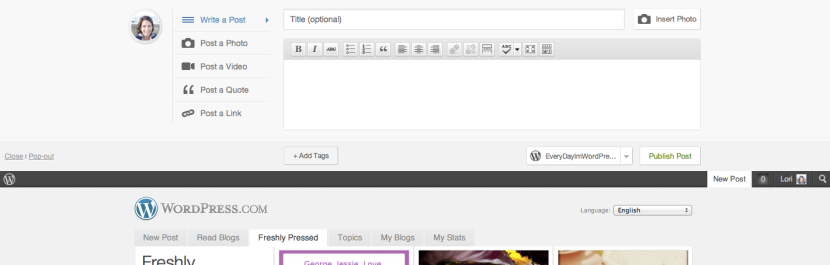
First, select the type of content you want to share (text, photo, video, quote, or link).
Use the Write a Post tab if you want to include multiple images in your post (or if you want to write a text-only post). If you just want to quickly share a single photo, select the Post a Photo tab.
When the post is ready, add some tags if you like, then choose the blog you want to post to (if you have more than one) using the drop-down menu below the post editor:

When you’re done, hit Publish Post, and you can go right back to whatever you were doing before you started the post.
Note that if you have a theme that supports post formats, posts published with the Post a Photo, Video, Quote, and Link tabs will be displayed on your site with a nifty, visually distinct post format:

An example of the Esquire theme's video and quote post formats.
Lastly, there’s also a New Post tab on the WordPress.com homepage for quick access to the new post editor:

Keep in mind that if you want to add categories to a post, preview it, or schedule it to publish at a later time, you can still create and edit posts with the dashboard editor by going to Posts → All Posts.
So what do you think of this new way to publish posts? Leave your feedback in the comments below.
- March 1, 2012
- Posting
 WordPress.com News
This is a great improvement! This will make life a lot easier for many bloggers. Thanks for all the work you do to improve WordPress!
LikeLiked by 1 person
Helpful. But is there a preview function? I find when I’m writing a new post that I’m constantly switching back and forth to see how it looks on the finished page.
LikeLiked by 2 people
We have some ideas for live post previews, so look out for that soon.
LikeLiked by 1 person
I am always impressed, and love WordPress. You are innovative, creative, and always informative, and helpful. Everyone, has always been resourceful. I love WordPress. So thank you…..To all, and Mr. Matt. I know, I have said it before. But, WordPress, has given me a vehicle, to be creative, to be myself, to express myself. And what a blessing. So God bless you all…..Thank you for all the information, you share, to make my writing experience a pleasure. Thank you…..
LikeLiked by 2 people
Nice. But the Toolbox-theme does not support the video- or quote-posttype…
LikeLiked by 1 person
If the post type is not supported by a theme it will use the normal post type.
LikeLiked by 1 person
The interface is all polished and all but there is one major flaw. As soon as I insert 2 photos, WordPress starts sending out email notifications followed by Twitter, FB and so forth. I have not even begun writing my post already I had to quickly dive into all my social timelines to delete them.
LikeLiked by 1 person
This was likely due to a temporary issue that is now fixed. You should be good to go now.
LikeLiked by 1 person
I just had a go on this, and for some reason, it kept posting the article on my website every minute I was editing it, as if it was saving the draft but publishing it again and again as well. Once the post was ready to go and published, the previous iterations remained on the site, so I had to go in and trash all but the finished one. Hope it was just a little glitch on my part.
LikeLiked by 1 person
Thanks for reporting this! We’ve fixed the issue, sorry about that!
LikeLiked by 1 person
Great idea and for sure a very helpful improvement.
Thanks for your amazing work.
LikeLiked by 1 person
Thanks WordPress ^.^
LikeLiked by 1 person
Wow! Super awesome stuff! Y’all are forever microwaving these wonderful new ways to get us writing and sharing. How cool is that?!!! Thanks!!!
LikeLiked by 1 person
Yikes, seems useful! I’l give it a spin …. thanks!
LikeLiked by 1 person
Whoa! I didn’t even notice that New Post feature up there! How cool is that? You guys are wonderful. I’ve only been here a short time, but I already love the site, the amazing support, and the wonderful community environment you’ve created. Thanks so much!
LikeLiked by 1 person
Nice! You guys are awesome. Next step, a toolbar I can install that lets me do it even when I’m not in WordPress?
LikeLiked by 1 person
Did you see our Chrome browser extension? It will allow you to do exactly that. Or you can click the “Popup” link to open the posting interface in a separate window. That way you can continue to browser other sites and still post.
LikeLiked by 1 person
All your hard work is recognized and much appreciated.
I’m very impressed with WordPress and glad I chose it. Thank you!
LikeLiked by 1 person
That will save some time! Now if I could just write faster…
LikeLiked by 1 person
I am newbi in wordpress, I stll can’t used it fast and perfectly. Can you help me please. it is more difficult than blogspot.com.
LikeLiked by 1 person
This looks great. I am going to give it a try. Thanks!
LikeLiked by 1 person
For some reason, it appeared that all my auto saved drafts were published when I used the “new post” tab. In addition, my Facebook and Twitter were not updated, though my settings say they are activated. Not an improvement for me.
LikeLiked by 1 person
There were some bugs with drafts originally but those should all be resolved now. Let us know if you continue to experience problems.
LikeLiked by 1 person
Digging it! Very reminiscent of Alex King’s “Post Format UI”
http://alexking.org/blog/2011/10/25/wordpress-post-formats-admin-ui
Sincerely hope to see this in WordPress 3.5.
LikeLiked by 1 person
I cannot imagine how this would EVER be useful to me. What would be VERY helpful is if I could change the font style on my blog. But this? Nope.
LikeLiked by 1 person
Check out Custom Design if you want to change the font style of your blog.
LikeLiked by 1 person
Sounds great, can’t wait to try it out especially with photos.
LikeLiked by 1 person
Such great news. There will be many, many happy prolific bloggers. Thanks for the news!
LikeLiked by 1 person
It’s not really something for me but I bet this will be useful for many other bloggers. I love how you guys keep updating and adding new awesome features. Keep up the good work!
LikeLiked by 1 person
Thanks! This should be nice!
LikeLiked by 1 person
awesome..this is so cool and saves so much time..thanks
LikeLiked by 1 person
Nice feature, Andy. Thanks!
LikeLiked by 1 person
I think this will be great! However, I just tried it and it posted my entry 10 times. Yikes! I know it will get worked out, but I just wanted to let you know. Thanks, WordPress!
LikeLiked by 1 person
Sorry about that, please give it another shot as we’ve made a couple of fixes since.
LikeLiked by 1 person
NIce
LikeLiked by 1 person
Using wordpress in my classroom daily has helped guide the artists down the right path. The ease pf using the program has helped them and me make my day to day more effective and successful. Great program… great job all. Korbartwuhs.wordpress.com.
LikeLiked by 1 person
This is a great idea, am wondering if you can schedule posts using this interface. I only see Publish and sometimes I want to schedule publication of my inspiration rather than immediately publishing.
LikeLiked by 1 person
Nice idea, but not useful to me. I extensively use the additional features, especially Categories and Schedule (and the Zemanta add-in).
Now, if you could make the “real” (full-function) New Post page load faster… THAT I would get excited about.
LikeLiked by 1 person
Yes, i always use this things. Simply!
LikeLiked by 1 person
I like the way you are making things easier to do. As a real novice in blogging, getting this type of help is wonderful.
Thanks for showing us new ways to do things!
Sandy O
LikeLiked by 1 person
Thanks for the developing you do WordPress
LikeLiked by 1 person
WordPress gets better and better each day!
LikeLiked by 1 person
Discovered the new posting tool spontaneously this evening. Super cool! I love a blog engine that just keeps making things easier. Thanks!
LikeLiked by 1 person
This new functionality is useless to me because it is geared towards “sharing content” rather than “writing posts”.
If it had been quick access to the full-featured dashboard editor, now that would have been useful.
LikeLike
Nice new information, really remarkable.
LikeLiked by 1 person
Thank you WordPress! This was a fantastic update!
LikeLiked by 1 person
While it is certainly handy and quick and will be a boon for some, I prefer the standard way that enables me to click choices – such as choose format, eg. ‘gallery’ and it enables me to publish to Face Book etc. This way dos not. Using the quick method , I have to edit the article after publishing to change the format etc..
LikeLike
What a great tool! I’m the type of person who always ends up with ten tabs open at one time, so my computer’s processor thanks you in advance. Can’t wait to try it out tomorrow!
LikeLike
this new way to post new posts is very helpful especially when I blog faster than my hands…congratulations…blogging is very important to me
LikeLike
Writing fast is good for first drafts, but not necessarily for posts. I believe in allowing a first draft to percolate. It always gets better after a second or or even a tenth read. Sorry to rain on your parade. This does not mean I do not appreciate your happiness engineers at wordpress, but sometimes I think you could take a rest.
LikeLiked by 1 person
Reblogged this on 3Sukma Press and commented:
let me share as my guidance to my web log reader. …thanks Andy
LikeLiked by 1 person
Thanks a lot
LikeLike
Thank you very helpful tool.
LikeLike
Excellent feature, makes wp.com publishing more flexible and dynamic.
LikeLike
Sounds like a terrific feature. Being new to the blogging scene, I find it hard to keep up with all the features. I hope to have a better grasp on it all before long.
LikeLiked by 1 person
Reblogged this on lightworkercounselor01.
LikeLike
Thanks WordPressssssssssssssssssssssss
LikeLiked by 1 person
Hmmm…I never “toss off” posts on the spur of the moment, myself, that sounds more like a facebook type of “post”! For me blogging is something I put a little time into, would only ever want to do it from my dashboard, rather than from the WordPress homepage. I guess this is a helpful option for some people, though.
Just hoping this change doesn’t mean that eventually wordpress.com bloggers will ONLY be able to post to their blog from WordPress’s homepage??? I.e. not from within their own blog?
LikeLiked by 1 person
looks great I can tell I have been gone awhile sad but true. sometimes though life gets in the way.
LikeLiked by 1 person
That is pretty awesome!
LikeLiked by 1 person
that is wonderful blog,,,nice to read it.
Regards – http://www.globalebusinessdeve.com
LikeLiked by 1 person
Iwill try .thanks.
LikeLiked by 1 person
I stumbled onto it today. Looks like a great idea!
LikeLiked by 1 person
Nice blog enjoyed reading. Thank you for the information
LikeLiked by 1 person
Awesome, Creative but most all it really works. 😉 Thanks
LikeLiked by 1 person
its good.
LikeLike
Reblogged this on Ich sag mal.
LikeLiked by 1 person
nice update…
I wonder if u can give a new update to the mobile page(m.wordpress.com)..
i cant find a a suitable wordpress app for my device.. i depend upon the wap page to publish my post.. And its a tough process to publish a post with that page..
Atleast u can add a upoad option for pictures.. It would be very nice if u come up with something like that…
Thank You..
Sanju ..
LikeLiked by 1 person
Reblogged this on kovshenin's blog.
LikeLiked by 1 person
I really enjoy the “Just write” functionality of Full Screen blog posting, but that`s only great for longer posts. This one seems very nifty and perfect for smaller, more simple updates and posts. Jolly good, WordPress!
LikeLiked by 1 person
Sadly it doesn’t adhere to your settings and is rather small. While it does take a second or so less time than going to the menus (Blog Name – New – Post), if I was interested in shaving seconds off once or twice a day I probably wouldn’t be blogging.
LikeLiked by 1 person
i am just learning how to use blogs and this has made it easier for me ,thank you.
LikeLiked by 1 person
Reblogged this on i cittadini prima di tutto.
LikeLiked by 1 person
This is great for mobile blogging. I love WordPress.
LikeLiked by 1 person
Reblogged this on Things I grab, motley collection .
LikeLiked by 1 person
Already made a try. Love it!
LikeLiked by 1 person
What a great idea and just perfect for when inspiration strikes. As I tend to take my time in writing my posts, the addition of a “Save to Drafts” option would be highly appreciated.
LikeLiked by 1 person
I think it appeals to those who are microbloggers more. For me, I would like a full editing experience ala Dashboard style straight from the New Post link.
LikeLiked by 1 person
Thank you so much – I love WordPress and I am so happy to be a member of WP !! Thank you ! 😎
LikeLiked by 1 person
I used this yesterday but it kept publishing every few minutes rather than auto save the draft, I ended up with about 14 posts before I realised, If this is fixed then its really good!
LikeLiked by 1 person
Already fixed! Give it another shot, I think you’ll love it. 🙂
LikeLiked by 1 person
Great! Luv this new option to publish spontaneously when necessary
LikeLiked by 1 person
It’s neat, except I miss an option to choose a category. There’s sufficient space for another button.
Also, what if while writing I change my mind about publishing now and rather want to save a draft?
LikeLiked by 1 person
The editor will auto-save a draft every 60 seconds, so you can always come back to the post later and edit it if you don’t want to publish it right now. We’ll work on making the draft status more obvious.
LikeLiked by 1 person
Its definitely a great idea.
LikeLiked by 1 person
I definitely like it! Than you so much 🙂
LikeLiked by 1 person
I ‘preview’ every article before I publish. Are you able to add that feature?
LikeLiked by 1 person
Watch this space. 🙂
LikeLiked by 1 person
Totally fr**** awesome. Well done.
LikeLiked by 1 person
Fantastic – have to try – but I feel very comfortable with doing the old way … want to be “at home” while doing my posts – not that “aggressive” blogger – too new to the game. Glad I chosen WordPress for my blog – so professional and always innovated. And your helpline and support are excellent – so quick to response and easy to understand. Top Class! Thanks a million.
LikeLiked by 1 person
I’m willing to give it a try. I am new at this and have become very discouraged this week with wordpress because I am finding it hard to use. when I add more than 1 photo and tell it left or middle alignment, they don’t stay there Or if I do text content first then pics below, I can’t find the content. I’m not a techie but I do realize the importance of blogs so need to find an easy way to make them work for me.
I will try your new method.
Thank you,
buyerbuilderconnection
success4147@gmail.com
LikeLike
Reblogged this on Informe Abertoe comentado:
Agora vai ficar mais fácil postar no wordpress.
LikeLiked by 1 person
“NEW POST” button looks like a convenient feature. I have 5 blogs. Thanks!
LikeLiked by 1 person
As far as I can see, it actually just got slower. Previously when I posted somethinng new I could instantly not only ADD tags but select already existing tags and the other category (themes or whatever, I forget the word). On this new facility I don’t see my established categories listed and “add tags” just seems to offer an opportunity to think up new ones. There may well be a way around this, but I can’t see it other than posting the new post and then rerturning to edit it.
LikeLiked by 1 person
If you want some of the more advanced posting options you’ll want to continue to publish posts from your Dashboard.
LikeLiked by 1 person
it’s great improvement you are providing such a biggest platform to users,viewers. me appreciate that efforts,,,,,
LikeLiked by 1 person
Thank you for the new feature. I agree with Gringita that it would be great to also have the ability to choose categories for the post.
LikeLiked by 1 person
I usually post both text and pics. How will this work for me?
Also, my posts are not automatically posting to Facebook. I have asked the WordPress Support twice for help, and have heard nothing.
Thanks,
Bruce
LikeLiked by 1 person
You can use the “Write a Post” option, and then insert a photo into your post using the “Insert Photo” button. If you just wanted to post a single photo with a caption, the “Post a Photo” option is the best.
We’ll have a look at the Facebook issue, it should post if you have it connected.
LikeLiked by 1 person
Great. Thanks.
LikeLiked by 1 person
Although I’m unlikely to use it myself, I can see it’ll be good for people to do quick posts. However, there are a couple of things I think would help: one is to make the URL to the blog one would post to, visibly change when choosing the blog it’s for, the other is to move the ‘New Post’ link to another part of the admin bar because where it is,for those of us using Firefox, that’s where our shortcuts are grouped and it’s very difficult to always hit the right icon or link each time. The links on the admin strip, are better on the left.
LikeLiked by 1 person
Indeed a great facility . i am really thrilled. Thanks a lot for this and I can understand the effort behind.
LikeLiked by 1 person
Thank you, for this great support. It is going to save much of the time bloggers spent in opening their ‘Dashboards’.
SYED ALI
alis2d@live.com
LikeLiked by 1 person
I love this feature! Problem: I can’t pick the category I want to post this under. To do this I need to go to the dashboard and edit my post.
LikeLiked by 1 person
Wow. This has just made me realise even more I made the right decision moving my blog from Tumblr. Great to see WP providing tools similar to other platforms in an even better way that tailors to users needs. A fantastic new addition. Thank you.
LikeLiked by 1 person
By the way, I can see you can add tags to post, where is the option to add Categories when using this ‘New Post’ feature from the Admin bar?
LikeLiked by 1 person
It doesn’t have the ability to add Categories yet.
LikeLiked by 1 person
Not sure if this tool is something that I will use often but I think it’s another great step forward for WordPress!
LikeLiked by 1 person
for people who blog on the fly it’s a good function, i suppose. It isn’t something I see myself using though.
LikeLiked by 1 person
Reblogged this on Caleb Ng.
LikeLiked by 1 person
Reblogged this on udsigt and commented:
Er du glad for WordPress? Så er der et godt fif her, til hvordan du hurtigtere kan publicere links, indlæg, citater og fotos.
Ikke nogen dårlig feature IMO…
LikeLiked by 1 person
I noticed this yesterday. Thank you. As a novice blogger i am enjoying learning more all the time. 🙂
LikeLike
For some of us a “faster way” is not a better way. As others have said, it’s obviously excellent for writing quick posts; but not for those of us who write our posts ahead (as inspired) or like to let our writing sit for a day or two and may do many edits or partial rewrites. Also there seems to be no place for “excerpts.” The “faster way” as an option–but not a replacement for –the traditional way we now use, clearly adds another useful feature.
LikeLiked by 1 person
Great idea. Well done again WordPress for making life easier.
LikeLike
How do you implement this for a self-hosted blog? I have the latest version of WordPress installed, but I can’t see this option on it. The plus sign on the left of the toolbar takes me straight to the dashboard.
LikeLiked by 1 person
This is a WordPress.com only feature.
LikeLiked by 1 person