

A Little Boost to Your Photos and Galleries

If a picture is worth a thousand words, then a digital photo is worth even more. All digital cameras embed extra information in each photo — things like camera make and model, date and time the photo was taken, focal length of the lens, shutter speed, etc.
We’re happy to announce two new features on WordPress.com for digital photos that will take advantage of your digital photo’s EXIF information!
Automatic Rotation
From now on JPEG images will be rotated automatically after uploading according to the camera’s original orientation. No more manually rotating all those portrait photos! What’s more, the rotation is “lossless” and preserves all embedded information in the image file (the JPEG image format is “lossy”, meaning that each time the image is edited, some of the fine color nuances may be lost). In short: your photos’ orientation/rotation is automatic and their image quality is preserved 100%!
Gallery Sorting
There are two new sorting options for galleries: Image Date/Time and Upload Order. These additional sort options are also available for previously-published galleries, offering you more fine control on how you display your images on your WordPress.com site. Have you ever inserted a Gallery in a post or page? Get started with Galleries.
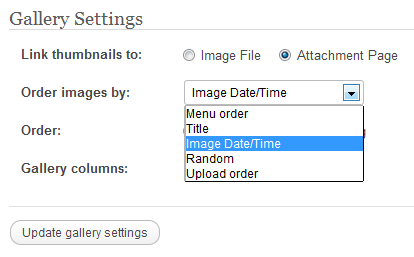
The Gallery Settings dialog
Both of these new features depend on the EXIF data saved in the JPEG image files, so if you edit your photos before uploading, make sure the software you use preserves that data.
So, upload few photos, create a gallery or edit an existing gallery and let us know what you think in the comments. Need photography inspiration? Check out the Photography topic in the WordPress.com Reader!
- May 30, 2012
 WordPress.com News
Maybe I should actually reset to the proper date and time every time I charge the battery. Mine probably all say “January 2008.” Something to think about.
LikeLike
Good idea. Usually the digital clock in the camera takes a super small amount of power to run, so it should keep going for a long time even if the battery is almost empty.
LikeLike
Sweet! Now I can have even more AWESOME PHOTOGRAPHS!! Woo-hoo!!!
LikeLike
Oh, the long, gruelling hours spent editing photos for my blogs only to see lesser quality results! Woe is me! Woe is me!
But now? Ta dah!!!
Hip, hip, hooray! Great news! Thanks ever so much!
LikeLike
Cool features, yay and thank you! Is there some way to display the EXIF data with an image, like a little table that shows the lens etc spex with an image?
LikeLike
This is already available in some photography themes like Duotone. Check it out.
LikeLike
oh, oh, I see… depends on the theme… I’m a Woo Themes Delicious Magazine girl. I don’t think they have that particular feature, but I do love Delicious Mag a lot and want to stay with it. hahaha, gawd, I’ve put so many hours in fitting our work to that theme! 🙂
Perhaps one day WP will add it generally. But anyway, till then, thanks for these 2 features! 🙂
LikeLike
Too funny — I just noticed this on a post I published today! I uploaded a picture of a dead squirrel. Yes, a dead squirrel — definitely worth a thousand words, right? Anyhow, it automatically flipped it for me … and I do believe it also gave me “rotate 90 degree” options, which I hadn’t seen before. Very cool!
LikeLike
The flip, rotate and crop options are part of the image editor (open it from the button under the thumbnail when viewing individual image properties in the gallery). However now digital photos are rotated automatically so you don’t have to rotate them “by hand” using the image editor.
LikeLike
Great! But the “changes” seemed imperceptible since I expected to see separate EXIF data fields for the “Date” and “Time” information and even more fields for the “Camera Settings”. Thanks.
LikeLike
You mean more gallery sorting options or displaying some of the EXIF information? Some of the camera settings are already displayed by photography themes, check out Duotone for example.
LikeLike
Thanks for replying Andrew: I “activated” the Duotone theme (temporarily) and didn’t see the “camera settings”, which should at least (in my mind/expectation) show up under the “WordPress.com User here].wordpress.com/wp-admin/upload.php” webpage and/or its action mode under “Edit Media” for attachments.
LikeLike
Perhaps I’m misunderstanding what you are looking for. The EXIF data is a part of the image. A photo theme would display some of that data but won’t let you edit it. If you want to edit the EXIF data, there is some “graphics tools” software specifically for that and you will have to do that before uploading the photos.
LikeLike
Great improvement. Now the only thing on my wishlist is to have a full export of the blog including mediafiles so it can be transferred to a WordPress.org self hosted environment. Currently that is the biggest omission that’s bugging me. For the rest it, I love WordPress.com’s features and stability!
LikeLike
Reblogged this on batmovilmex.
LikeLike
All this features look great. Any idea how long before we see these WP features on godaddy.com’s servers?
LikeLike
This is such great news. Will save a lot of time and editing.
LikeLike
Great! Now can you get rid of the carousel?
LikeLike
That’s a neat feature – well done the team.
LikeLike
Great!
LikeLike
Perfect! You just made it even easier for me to upload my photos… thanks again for all the recent updates
LikeLike
These are excellent additions to the gallery. I can’t say too much about rotation; I haven’t usually had a problem with that. But having to sometimes go in and fix order by hand wasn’t desirable. Being able to arrange automagically by clock order makes a gallery easier to keep as I desire it.
LikeLike
Yes! This awesome. I have been using galleries in my previous post. I’m going to try this at home later. Thanks wordpress!
LikeLike
Reblogged this on enfinelmar.
LikeLike
Junk – I rotate some of my pictures now you tell me the rotation will be undone – pure junk
LikeLike
No it won’t. When you rotate photos by hand the software you use (usually) resets the EXIF orientation, so the image will not be rotated again after uploading.
LikeLike
Sounds good. However most of my blogging is done whilst I am off line and I only do the final upload when I can find connectivity. For this reason I use BlogPress to connect to WordPress. Would be terrific if you could use the WordPress app whilst offline.
LikeLike
Good improvements! I didn’t like using gallery before because they’d always go out of the order I wanted them. I’ll try it again on the next batch of photos.
LikeLike
Trying this out for the first time today and it’s been a nightmare. The biggest issue is that it’s rotating incorrectly and won’t let me edit – it freaks out IE and tries to shut down. Help! Any advice would be greatly appreciated!
LikeLike
The auto-rotate only follows the directions set by your camera, i.e. it would rotate a photo if the camera set the EXIF orientation to something else than “top left”.
If you edit your images before uploading nearly all graphics apps would automatically rotate the photo and reset the EXIF orientation. In this case your photos will not be rotated automatically after uploading them. However there are probably some older or more basic graphics apps that won’t do this.
LikeLike
What happens if one is using an image that is not a photograph, for instance artwork, which doesn’t have EXIF info – what sorting options will be offered them?
LikeLike
When the JPEG images don’t have EXIF information and the “Image Date/Time” gallery sorting option is selected, it would fall back to sorting by upload order. All other sorting options would not be affected.
LikeLike
Great. Thanks.
LikeLike
This is fantastic. I take a lot of my flower photo’s vertical and sometimes spend several tries trying to get them to rotate.
LikeLike
Wow! Thank you so much for doing this
Alexandria
LikeLike
Is metadata such as keywords, author etc retained as well? That would be handy from the point of view of people finding your images/blog using search engines.
LikeLike
Fantastic News. WordPress is constantly changing but unlike others it always for the better.
LikeLike
Great update. Is there a way to pin some or all photos in a gallery ?
LikeLike
It didn’t do this before? Are edited photos automatically lined up how they were taken? I’ve never experienced the issue that was addressed. However, I do appreciate the EXIF data, will be nice to use.
LikeLike
hope a perfect tool,
LikeLike
I would prefer the photos didn’t rotate automatically, for when I resize them and edit them prior to posting, I rotate them myself, and now I find the images I upload are sideways. Alternatively, it would be great to be able to rotate the images once uploaded. Cheers!
LikeLike
When you edit / rotate your photos before uploading, make sure the software you use resets the EXIF orientation for them too. Most graphics apps would do that by default, perhaps in some you can set this in the options.
LikeLike
Thanks!
LikeLike
It didn’t flip all of my photos in a gallery. Does it flip at time of downloading or when you upload the gallery? Some were flipped and other not – any clues ??
LikeLike
It rotates the images right after uploading and follows the directions set by your camera. If all photos were taken with the same camera and uploaded yesterday or today, perhaps open a support ticket so we can determine why some weren’t rotated.
LikeLike
Not just for digital shooters, old school film users like me are also happy at this new facility..
LikeLike
I like that. Does WP leaves the EXIF data intact in an image? That way you can embed a copyright notice..
LikeLike
Yes, the EXIF data is intact on the original image, rotated or not.
LikeLike
I was posting pictures last night and I found it odd that some of the pictures I uploaded automatically rotated, although the picture does not need to be rotated. Good thing there was an edit button to correct it. Is there a way I could get rid of the automatic rotation thing? Or should I?
LikeLike
Generally you shouldn’t. The rotation follows the direction set by the camera. Haven’t seen that yet but it’s possible that the camera was wrong for some photos. If that happens often, the next best thing would be to edit/rotate your photos before uploading them (only make sure the software you use resets the EXIF orientation). That way you would have full control.
LikeLike
How about that – yesterday I was trying to find out about galleries, and failing to find the right place for help. Now you email me with the exact information I need… telepathy.wordpress.com!
Thanks & greetings from Transylvania.
LikeLike
More good options for Word Press bloggers and even more reason to blog on Word Press! Thank you!
LikeLike
Very cool feature. Love the upload options: time vs upload order. Thanks!
LikeLike
Reblogged this on pravinchn.
LikeLike
Was wondering why some of the Art images I posted were lacking in tones and colour. Will explore in finer detail later. I wasn’t aware of the EXIF data and loss through refining prior to posting. Thanks for updating 🙂
LikeLike
Another innovation! Good for you. WordPress!
LikeLike
I just got off the phone with godaddy.com. They assure me that WordPress on their server is identical the the WordPress on wordpress.com. Is this true? Or is their a difference? Is there a lag time before these features get propagated over to godaddy.com servers? Is their anyway of knowing what version of WordPress is running on wordpress.com?
LikeLike
They weren’t entirely correct — WordPress.com includes lots of features and enhancements that Godaddy does not have. Many features overlap between the two, but not everything.
LikeLike
like the idea
LikeLike
automatic rotation?!! awesome update!
LikeLike
Why is it so convoluted to add an existing photo from your library to a gallery! So frustrating!
LikeLike
Once again, thank you WordPress! A reminder as to why I chose WordPress over blogger! Keep it up!
LikeLike
I write a food blog in which I usually upload one main picture and then put the rest of the pictures showing the cooking process in a slideshow. What the slide show does is, it includes the main picture in it as well, which I don’t want. No amount of sorting or numbering works. Is there a way to not have all pictures in the post’s gallery show up on the slideshow?
LikeLike
Not a “direct” setting (for now) but there is a workaround. You can exclude an image from the gallery if the image is attached to another post, even a draft. Then you still can insert it in any post but it won’t show in the gallery/slideshow.
LikeLike
Thank you. I will try that. I do hope some future fixes will include this fix too!
LikeLike
Great update, now I just need to get out there and take more photos.
LikeLike
Is there a way to enter a gallery slide show in a post that does not include all the photos used in the post? Sometimes I want to post static photos and in another area in the same post I would like a slide show of different photos, not every photo used on the post. Possible?
Right now it seems when a gallery is posted it uses all of the photos used in the post.
LikeLike
Sure, there is a workaround (the above reply) .
LikeLike
My images are being rotated again after uploading…any suggestions? I tried to go back in, re-rotate and save, upload again, with no luck.
Thanks! April
LikeLike
If you edit your photos before uploading, perhaps check the settings of the image editing software you use and enable resetting of the EXIF orientation.
LikeLike
This rotation feature is a big problem for me. I am using a really old version of photoshop to edit my pictures and when I upload to wordpress I can see that the new feature rotates them to what the camera originally captured. When I try to rotate them in wordpress, explorer freezes up and it doesn’t work. So this is a total bummer for me. Is there anyway to block this new feature? Maybe I will try the suggestion above… enabling the EXIF orientation… like I know what that means.
LikeLike
Thanks, I have always found that WordPress is a dynamic, elegant and versatile platform for my photoblog. Thank you for the useful and innovative feature.
LikeLike
Andrew, thanks for the hint (above) that in the future it may be possible to exclude images from the Slideshow feature and for the new sort options in the Gallery feature!
LikeLike
I would like to be able to upload in batch and then select the order that I want the photos to appear. This isn’t always in the upload order or title order (typically I title by a sequence, e.g., summer1, summer2, etc when editing photos). I tried the other day by renumbering in the boxes to change the order but it didn’t make any difference. Changed the titles within WordPress and that wouldn’t allow me to order by title either — it preserved the title photos had when uploaded (which makes sense in a way). I thought that I had used the boxes to change the menu order before, but it doesn’t seem to work now. Suggestions?
LikeLike
If you leave the default gallery sorting on (Menu order), the numbers in the boxes will be used. You can arrange the images by dragging the items in the gallery (while folded) up and down which will reset these numbers.
LikeLike
Thanks. That’s what I’ve done in the past, but it didn’t seem to be working the other day. I can’t say that it wasn’t user error. 🙂 Just tried again and it was working as expected. Thanks for your help.
LikeLike
Yes! There is Image Date/Time sorting already! Thanks for making my blogging life easier 🙂
LikeLike
Love the idea of controlling the order in the gallery by upload order, a much needed feature – thank you!
LikeLike
I am rotating photos in MS word and then adding them to my WP blog ( today ). WP is changing them back to their original ( wrong ) rotation. Very annoying.
LikeLike
Rotate them directly in WordPress, there’s instructions for how to do so here: https://wordpress.com/support/images/image-editing/
LikeLike